
Showing posts with label theory. Show all posts
Showing posts with label theory. Show all posts
Thursday, August 22, 2024
Spaghetti
I find it interesting that when I was learning coding around the turn of the millennium, we were trained to avoid GOTO commands, because it contributed to what was referred to as "spaghetti code", where everything is a jumbled mess, with the execution jumping around back and forth through the code. But today, whenever I try to make sense of the code that powers RPG Maker (so I can modify it to do what I want), I'm hampered by "modular coding", where everything is broken up into tiny snippets almost to the point of looking like they do nothing, and the execution is constantly jumping around through thousands of lines of code, and you have to track down an issue like a hunter in the bush, and still can't figure out how the damn code is doing a thing, because there are references everywhere, and you can't make heads or tails of any of it. It's like when you look up a word in a dictionary, and it gives another word you don't know, so you look that word up, and end up going around in circles, without ever actually figuring anything out. I'd rather slurp on a single noodle until I reach the end, than try to match up a single strand from a plate of cut up spaghetti.

Saturday, March 21, 2020
Update on the Update
So, I updated RPG Maker MV (to version 1.6.1), and - I suppose this shouldn't be surprising, but - I'm not impressed. It doesn't fix any of the bugs I'd hoped it would fix (no idea what "freeze when changing screen" is supposed to refer to, but it is most decidedly not the map transfer lurch that I hate), and introduces some new bugs (like a weird text glitch on the title screen when I playtest), while threatening to break plugins (I've already had to fix one so far, in a game that uses very few of them). So, it looks like I'm going back to version 1.5.0. God, this is so frustrating. I envy authors who can scribble runes on paper and communicate across eons, while each version of the software I take time to learn works on only a handful of machines, and becomes obsolete before I have the time to finish a single project...
So I'll be going back, making a significant change to the layout of my secret level, and then still polishing up my project and slimming the download file. That might take some time, but when I'm finished, I'm going beta and finally putting this game into the hands of my testers. If I have any.
So I'll be going back, making a significant change to the layout of my secret level, and then still polishing up my project and slimming the download file. That might take some time, but when I'm finished, I'm going beta and finally putting this game into the hands of my testers. If I have any.
Tuesday, March 10, 2020
Load Lag Issue [Resolved]
If you read my note at the end of the post when I released Sodom & Gomorrah two and a half weeks ago, you'll recall that I was having an issue with the map taking an extra long time to load. Well, I have some good news - I've figured out what was causing the delay, because I encountered the same issue on the Purgatory map I am currently working on, and I was able to isolate the problem this time. And it turns out, it's my old nemesis, the RPG Maker MV BGM Delay, rearing its ugly head again.
The thing that these two maps have in common is that they call a BGM file to be played (most of this game relies on silence and sound effects as opposed to having a running soundtrack), and BGM files are significantly larger than shorter sound effect files and images (which have a smaller file size compared to audio). So what's happening is the Preload Manager is hanging while loading those large BGM files.
And before you say, "just disable the Preload Manager", this is exactly the reason I started using it in the first place. RPG Maker MV loads files on the fly (I'm honestly wondering what VX Ace did differently, and why MV is so utterly incapable of performing such a basic function that its predecessor had no issue with), so when you call a BGM, it takes a couple seconds for it to load and then start playing. The Preload Manager doesn't load it any faster, it just opts to load the file ahead of time when you transfer to the map that uses it, so it will be ready the second it's called. It's a tradeoff.
The bad news is that there isn't a whole lot I can do about it. Moving the loading to the front of the map is preferable to waiting until you need the file for it to load. What I can do is bump it all the way to the start of the game, when it's booting up, and players are expecting to wait a few seconds. So far, this seems to work pretty well (the affected map transfers are much quicker), although if I had more than a few BGMs throughout my game, it might make the boot load itself unwieldy.
In fact, I'm wondering if the Preload Manager is any use at all for anything other than BGMs, since - unless I'm mistaken - that's the only thing I recall having loading problems with. In any case, I've modified it so that now it only performs boot loading of predesignated BGM files and not its usual preload on map transfer, so we'll try it out that way and see if any problems arise...
Followup: It looks like I may have to revert to between-map loading after all. There's a question of how long a given file remains in memory after being pre-loaded, and I'm concerned that if the BGM is loaded at startup, it may be purged long before the player, during the regular course of playing the game (and not going directly to the parts I'm working on, as I do when I'm testing), gets to the point where the file is needed.
I haven't been able to test that yet (as it requires longer periods of play-testing), but there's also another problem involving a graphical glitch when switching characters to their damage sprites (to make them appear slouched or fallen over) - a momentary blip, presumably due to the program loading the image on demand.
Prior to investigating the load lag issue, I had replaced the "Now Loading" screen with a blank screen, because I thought it was annoying and disrupts the player's immersion into the game. This actually contributed to my confusion, because when the map hung before loading, I didn't immediately recognize what it was doing. I think I might ultimately just put the "Now Loading" screen back in, and learn to live with it (even though it annoys me when it only shows up for a fraction of a second, as on most maps - better off not showing up at all, if you ask me...).
The thing that these two maps have in common is that they call a BGM file to be played (most of this game relies on silence and sound effects as opposed to having a running soundtrack), and BGM files are significantly larger than shorter sound effect files and images (which have a smaller file size compared to audio). So what's happening is the Preload Manager is hanging while loading those large BGM files.
And before you say, "just disable the Preload Manager", this is exactly the reason I started using it in the first place. RPG Maker MV loads files on the fly (I'm honestly wondering what VX Ace did differently, and why MV is so utterly incapable of performing such a basic function that its predecessor had no issue with), so when you call a BGM, it takes a couple seconds for it to load and then start playing. The Preload Manager doesn't load it any faster, it just opts to load the file ahead of time when you transfer to the map that uses it, so it will be ready the second it's called. It's a tradeoff.
The bad news is that there isn't a whole lot I can do about it. Moving the loading to the front of the map is preferable to waiting until you need the file for it to load. What I can do is bump it all the way to the start of the game, when it's booting up, and players are expecting to wait a few seconds. So far, this seems to work pretty well (the affected map transfers are much quicker), although if I had more than a few BGMs throughout my game, it might make the boot load itself unwieldy.
In fact, I'm wondering if the Preload Manager is any use at all for anything other than BGMs, since - unless I'm mistaken - that's the only thing I recall having loading problems with. In any case, I've modified it so that now it only performs boot loading of predesignated BGM files and not its usual preload on map transfer, so we'll try it out that way and see if any problems arise...
Followup: It looks like I may have to revert to between-map loading after all. There's a question of how long a given file remains in memory after being pre-loaded, and I'm concerned that if the BGM is loaded at startup, it may be purged long before the player, during the regular course of playing the game (and not going directly to the parts I'm working on, as I do when I'm testing), gets to the point where the file is needed.
I haven't been able to test that yet (as it requires longer periods of play-testing), but there's also another problem involving a graphical glitch when switching characters to their damage sprites (to make them appear slouched or fallen over) - a momentary blip, presumably due to the program loading the image on demand.
Prior to investigating the load lag issue, I had replaced the "Now Loading" screen with a blank screen, because I thought it was annoying and disrupts the player's immersion into the game. This actually contributed to my confusion, because when the map hung before loading, I didn't immediately recognize what it was doing. I think I might ultimately just put the "Now Loading" screen back in, and learn to live with it (even though it annoys me when it only shows up for a fraction of a second, as on most maps - better off not showing up at all, if you ask me...).
Saturday, June 9, 2018
Revisiting the Tower of Bab-il
You probably know by now that I enjoy recreating maps from older games. Partly for nostalgia, partly for rote experience in putting maps together (to hone my skills for when I create my own maps), and partly just because it's hypnotic, and I tend to "fall into it" easily, and it's a good way to log hours working in RPG Maker when my creative juices aren't flowing so freely. Suffice to say, it's monotonous work, but I do enjoy it.
Anyway, I worked out a makeshift floor plan for the Tower of Zot from Final Fantasy IV a while ago, but that was just an appetizer. What I think I really wanted to work on was the even greater Tower of Bab-il from the same game. I love this dungeon for so many reasons. It's so epic. Not only is it a tower tall enough to bridge two worlds - the Overworld and the Underworld - but it actually forms two mostly separate dungeons that you encounter at different points in the game. So the first time, you think to yourself, "this place is huge", and yet there are still parts of it you can see across walls and such that you haven't accessed. Then you come back later in the game (starting from the top instead of the bottom this time), and you think, "oh cool, I'm back here." And you imagine that you've explored most of it already, until you realize just how much more was left. And then there's all kinds of cool stuff going on in the tower - mad scientists, and dramatic transformations, tricks and traps; and you finally escape the second time by hijacking an airship that's docked. Going back through this tower, I'm realizing how much it has influenced me, in terms of bits and pieces of ideas that I have planned for one or more dungeons in Dragonfaith.
Well, if you're tired of just sitting around talking about it, I invite you to explore the tower yourself. I've recreated it in RPG Maker MV. I used parallax mapping for the first time, because, although low-res, the original graphics have much more character than what RPG Maker provides. The treasure chests aren't operational, there are no enemy encounters (so explore to your heart's content), but I did manage to pull together a Paladin Cecil sprite for you to lead around. I figure it's worth at least a walk-through, for old time's sake.
Tower of Bab-il: Win | Mac (130 MB)
Anyway, I worked out a makeshift floor plan for the Tower of Zot from Final Fantasy IV a while ago, but that was just an appetizer. What I think I really wanted to work on was the even greater Tower of Bab-il from the same game. I love this dungeon for so many reasons. It's so epic. Not only is it a tower tall enough to bridge two worlds - the Overworld and the Underworld - but it actually forms two mostly separate dungeons that you encounter at different points in the game. So the first time, you think to yourself, "this place is huge", and yet there are still parts of it you can see across walls and such that you haven't accessed. Then you come back later in the game (starting from the top instead of the bottom this time), and you think, "oh cool, I'm back here." And you imagine that you've explored most of it already, until you realize just how much more was left. And then there's all kinds of cool stuff going on in the tower - mad scientists, and dramatic transformations, tricks and traps; and you finally escape the second time by hijacking an airship that's docked. Going back through this tower, I'm realizing how much it has influenced me, in terms of bits and pieces of ideas that I have planned for one or more dungeons in Dragonfaith.
Well, if you're tired of just sitting around talking about it, I invite you to explore the tower yourself. I've recreated it in RPG Maker MV. I used parallax mapping for the first time, because, although low-res, the original graphics have much more character than what RPG Maker provides. The treasure chests aren't operational, there are no enemy encounters (so explore to your heart's content), but I did manage to pull together a Paladin Cecil sprite for you to lead around. I figure it's worth at least a walk-through, for old time's sake.
Tower of Bab-il: Win | Mac (130 MB)
Monday, February 12, 2018
A Crash Course
I just had quite a fright. I was actually started thinking about releasing the next stage of Ascension (after the one I posted just this past Friday). I was finishing some stuff up tonight, and while working on it, my computer crashed. Don't know why. Wasn't doing anything I'd expect would cause my computer to crash. But I restarted, and re-opened RPG Maker MV, and when I went to open up my project, it wouldn't open. Said it couldn't read some of the data files. Apparently, they'd been corrupted (whether by the crash itself or whatever caused the crash, I don't know). That's when I started to get scared.
I replaced each corrupted file in succession (determined by trying to open the project after each one and seeing what other file the program couldn't read) - which included all of the JSON files in the data folder (minus the specific maps), as well as plugins.js - from my last backup, which I copied before I renewed work on this project at the start of January. (I know, obligatory warning about backing up your work - but I got enough shit to do and keep track of, both with this game and the rest of my life; I can't make backups every single day).
Finally got the project to open, but now I was looking at having to repeat all the work - essentially my whole adaptation effort - I've put in since the start of the New Year (and I've been working on this game almost every day since January 1 - the only exceptions being the couple of weekends I've been out of town). I won't lie. In the back of my mind, I was entertaining the thought of giving up game development for good. But then as a last ditch effort, I remembered the releases I've posted here on this blog (they've had a purpose all along - even if nobody plays them - that I didn't even know about!).
Thankfully, I was able to re-copy all the corrupted files from as late as the version of the game I released on Friday. (The first thing I did after that was backup my whole project). I'd be annoyed that now I'm going to have to repeat all the work I've done the last three nights, but honestly, most of that work has just been porting the next stage from one engine to another, and not any significant modifications or new content (thank god this stage has very little dialogue!), and compared to the devastating implication of repeating all the work I've done since the beginning of January(!), all I'm doing now is counting my lucky stars, and hoping something like this doesn't ever happen again...
Update (2/13/18):
Unfortunately, my relief was a little premature. Although I did manage to salvage the data, I realized when I tried to playtest last night that the game wouldn't run. Not sure why, and I have no clue how to fix it. So now I have to copy all my data (again...) into a new, fresh project. Maybe one of these years, I'll actually reach the end of the game before some act of god causes me to start over from the beginning. I feel a bit like Sisyphus, trapped in my very own special stage of Hell.
I replaced each corrupted file in succession (determined by trying to open the project after each one and seeing what other file the program couldn't read) - which included all of the JSON files in the data folder (minus the specific maps), as well as plugins.js - from my last backup, which I copied before I renewed work on this project at the start of January. (I know, obligatory warning about backing up your work - but I got enough shit to do and keep track of, both with this game and the rest of my life; I can't make backups every single day).
Finally got the project to open, but now I was looking at having to repeat all the work - essentially my whole adaptation effort - I've put in since the start of the New Year (and I've been working on this game almost every day since January 1 - the only exceptions being the couple of weekends I've been out of town). I won't lie. In the back of my mind, I was entertaining the thought of giving up game development for good. But then as a last ditch effort, I remembered the releases I've posted here on this blog (they've had a purpose all along - even if nobody plays them - that I didn't even know about!).
Thankfully, I was able to re-copy all the corrupted files from as late as the version of the game I released on Friday. (The first thing I did after that was backup my whole project). I'd be annoyed that now I'm going to have to repeat all the work I've done the last three nights, but honestly, most of that work has just been porting the next stage from one engine to another, and not any significant modifications or new content (thank god this stage has very little dialogue!), and compared to the devastating implication of repeating all the work I've done since the beginning of January(!), all I'm doing now is counting my lucky stars, and hoping something like this doesn't ever happen again...
Update (2/13/18):
Unfortunately, my relief was a little premature. Although I did manage to salvage the data, I realized when I tried to playtest last night that the game wouldn't run. Not sure why, and I have no clue how to fix it. So now I have to copy all my data (again...) into a new, fresh project. Maybe one of these years, I'll actually reach the end of the game before some act of god causes me to start over from the beginning. I feel a bit like Sisyphus, trapped in my very own special stage of Hell.
Saturday, September 23, 2017
World Map Analysis
It occurs to me that perhaps instead of just reconstructing these world maps, it might do to analyze them in some detail. If you haven't guessed yet, the first one is the world map from the original Final Fantasy, and the second one (hereafter referred to as "Alefgard") is the world map from the very first Dragon Quest/Warrior game. It's not entirely fair to compare these two games side by side, as Final Fantasy came after Dragon Quest, and represents a slight evolution over the earlier game (and is more comparable to Dragon Quest II), but that doesn't mean I can't discuss their differences.
Firstly, the FF world map is twice as large as Alefgard (256 pixels square vs. 128). But this is forgivable because in DQ, you have to walk everywhere, and you have to start from the same central location every single time (it's the only place you can save your game). Final Fantasy, on the other hand, features a ship for sea travel, and also an airship. As a result, Alefgard is a lot more "landlocked" than the world of Final Fantasy, where you can fly around and sail the high seas.
This distinction is relevant to my own RPG, because I've been debating whether to make my world map more landlocked (which is my first instinct, given how I envision the world in my head - and is more like the world we live in, I think - or at least the part of it I'm familiar with), or to mimic the style of the Final Fantasy games I am most heavily inspired by, with lots of wispy peninsulas and the like. I think that ultimately the decision will come down to what works best for my game, and I think that it will most likely turn out to be more landlocked than the FF map I've reproduced, but not quite so landlocked as Alefgard, since sea and air travel are still major elements of my game.
This may be headed slightly into off-topic territory, but another distinction my game has from the Final Fantasies I am inspired by is the fact that in those games, typically the world map represents the whole world (albeit sometimes with room in the game for other worlds, like underworlds and alternate dimensions and such). In my game, I want to give the player the sense that they may only be exploring part of the world they're in - just the part they have access to - since the plot is about rediscovering the world after the collapse of civilization. Also, I've reserved a whole separate "continent" (though maybe more of a large island) for the final stages of the game, and I want to keep it hidden and off limits until the player gets to a certain point. As such, though I may grant them versions of sea and air travel earlier, I have to contain their voyaging to a point so as to prevent them from entirely getting the sensation, as you do in Final Fantasy games, of sailing around the world and coming back to where you started. Yet, I still want to maintain that sense of heading out to sea, getting disoriented, and not knowing where you are. I had a great idea for a "deep sea" zone that's actually separate from the main world map, but the loss of the instantaneous map transfer ability in RPG Maker MV would make it clunky and dispel the illusion of sailing in a world that's much bigger than the actual map you're exploring.
Sigh, I don't have a solution to this problem as of yet, and it's something I'll have to figure out before the game is done. Ah well. I think that's enough analysis for now. I've already gone into depth about how much I love the game flow (which relates, in part, to how the world is set up) in the original Final Fantasy. Until next time!
Firstly, the FF world map is twice as large as Alefgard (256 pixels square vs. 128). But this is forgivable because in DQ, you have to walk everywhere, and you have to start from the same central location every single time (it's the only place you can save your game). Final Fantasy, on the other hand, features a ship for sea travel, and also an airship. As a result, Alefgard is a lot more "landlocked" than the world of Final Fantasy, where you can fly around and sail the high seas.
This distinction is relevant to my own RPG, because I've been debating whether to make my world map more landlocked (which is my first instinct, given how I envision the world in my head - and is more like the world we live in, I think - or at least the part of it I'm familiar with), or to mimic the style of the Final Fantasy games I am most heavily inspired by, with lots of wispy peninsulas and the like. I think that ultimately the decision will come down to what works best for my game, and I think that it will most likely turn out to be more landlocked than the FF map I've reproduced, but not quite so landlocked as Alefgard, since sea and air travel are still major elements of my game.
This may be headed slightly into off-topic territory, but another distinction my game has from the Final Fantasies I am inspired by is the fact that in those games, typically the world map represents the whole world (albeit sometimes with room in the game for other worlds, like underworlds and alternate dimensions and such). In my game, I want to give the player the sense that they may only be exploring part of the world they're in - just the part they have access to - since the plot is about rediscovering the world after the collapse of civilization. Also, I've reserved a whole separate "continent" (though maybe more of a large island) for the final stages of the game, and I want to keep it hidden and off limits until the player gets to a certain point. As such, though I may grant them versions of sea and air travel earlier, I have to contain their voyaging to a point so as to prevent them from entirely getting the sensation, as you do in Final Fantasy games, of sailing around the world and coming back to where you started. Yet, I still want to maintain that sense of heading out to sea, getting disoriented, and not knowing where you are. I had a great idea for a "deep sea" zone that's actually separate from the main world map, but the loss of the instantaneous map transfer ability in RPG Maker MV would make it clunky and dispel the illusion of sailing in a world that's much bigger than the actual map you're exploring.
Sigh, I don't have a solution to this problem as of yet, and it's something I'll have to figure out before the game is done. Ah well. I think that's enough analysis for now. I've already gone into depth about how much I love the game flow (which relates, in part, to how the world is set up) in the original Final Fantasy. Until next time!
Friday, September 22, 2017
World Mapping
I made a breakthrough the other day on some of the background and plot details for a significant dramatic turn in my RPG that occurs later in the game, past where I've done most of my work so far. I got some great dialogue written down for a confrontation that I'm really excited about. I wish I could finish working on this game already so I could show it to you. But it's a behemoth of a project. I'm finding that, as much as I can piece together some pretty neat maps, it's such a task and a chore, and more often than not it's the thing that's holding me back from making faster progress on my game. Simply put, I wish I could hire a mapper - somebody to take leads from me, but with a talent (and more of an enjoyment, rather than dread), for putting together game worlds of this sort. But, there's no point in wasting time complaining - I just gotta get it done, like it or not.
And on that subject, I've been thinking about world maps lately. I really want to put my world map together. I have a pretty strong idea of everything I want to be on there (even if I haven't mapped out the interiors of all the towns and dungeons yet), but it's such a colossal task, putting a whole world together, tile by tile. I can't decide whether it'd be better to work top-down as my instinct suggests (i.e., get a general idea of where everything sits and then fill in the details), or from the bottom up, piecing some tiles together here and there and seeing where they end up fitting together (not really my style). But one of the problems is that I'm not 100% sure where I want everything to go, especially in relation to everything else. I've sketched out the different areas - call them "countries" - on paper several times, and shuffled them around. But some of the game details, like how you get from A to B, and when you need to have access to C, will affect where things should be placed, and I guess I'm still not 100% confident about all of that.
Still, I've come to the realization that you can't expect yourself to be good at something the first time you've ever done it. And mapping is one thing, but creating world maps provides its own unique challenges. So I've decided that I should start out by practicing putting some world maps together, using some of the maps from the very games that serve as my primary inspiration (i.e., classic, 2D VG RPGs such as Final Fantasy and Dragon Quest/Warrior). At this point, it's just a copy job, so I'm not getting any practice using my creativity and imagination, but it's like starting out learning guitar by playing other people's songs. And copying huge 256 tile square maps is a daunting task (although I find it strangely relaxing - I could go in a trance and map like this for hours). But I think that digging in and getting my hands into the nitty gritty, examining these maps literally tile by tile, and seeing how the experts do it, will help me to build something of a muscle memory, and hone my instincts on what works well and what doesn't. So that when it comes time to design my own world map, it won't feel so much like I'm jumping out of a plane without a parachute.
So here's what I've completed so far, using RPG Maker MV's native tiles. Fans of the real old school RPGs will surely recognize them (hint, they're from games I've already reviewed right here on this blog). I haven't decided yet whether I'm going to do more or leave it at that (it takes a lot of time, but then I've drawn lots of inspiration from the SNES-era Final Fantasies, and they have some great world maps - especially FFV). It's tempting to just copy these games start to finish, because I love them so much, but while that would be good practice for putting an RPG together, it would be kind of pointless, as those games already exist... Ah well. here's this:
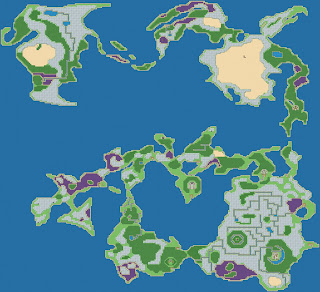

Can you name these worlds? :-3
And on that subject, I've been thinking about world maps lately. I really want to put my world map together. I have a pretty strong idea of everything I want to be on there (even if I haven't mapped out the interiors of all the towns and dungeons yet), but it's such a colossal task, putting a whole world together, tile by tile. I can't decide whether it'd be better to work top-down as my instinct suggests (i.e., get a general idea of where everything sits and then fill in the details), or from the bottom up, piecing some tiles together here and there and seeing where they end up fitting together (not really my style). But one of the problems is that I'm not 100% sure where I want everything to go, especially in relation to everything else. I've sketched out the different areas - call them "countries" - on paper several times, and shuffled them around. But some of the game details, like how you get from A to B, and when you need to have access to C, will affect where things should be placed, and I guess I'm still not 100% confident about all of that.
Still, I've come to the realization that you can't expect yourself to be good at something the first time you've ever done it. And mapping is one thing, but creating world maps provides its own unique challenges. So I've decided that I should start out by practicing putting some world maps together, using some of the maps from the very games that serve as my primary inspiration (i.e., classic, 2D VG RPGs such as Final Fantasy and Dragon Quest/Warrior). At this point, it's just a copy job, so I'm not getting any practice using my creativity and imagination, but it's like starting out learning guitar by playing other people's songs. And copying huge 256 tile square maps is a daunting task (although I find it strangely relaxing - I could go in a trance and map like this for hours). But I think that digging in and getting my hands into the nitty gritty, examining these maps literally tile by tile, and seeing how the experts do it, will help me to build something of a muscle memory, and hone my instincts on what works well and what doesn't. So that when it comes time to design my own world map, it won't feel so much like I'm jumping out of a plane without a parachute.
So here's what I've completed so far, using RPG Maker MV's native tiles. Fans of the real old school RPGs will surely recognize them (hint, they're from games I've already reviewed right here on this blog). I haven't decided yet whether I'm going to do more or leave it at that (it takes a lot of time, but then I've drawn lots of inspiration from the SNES-era Final Fantasies, and they have some great world maps - especially FFV). It's tempting to just copy these games start to finish, because I love them so much, but while that would be good practice for putting an RPG together, it would be kind of pointless, as those games already exist... Ah well. here's this:


Can you name these worlds? :-3
Thursday, December 15, 2016
Modular Programming
Modular programming is like taking an algorithm, shattering it into a thousand pieces, and then burying each piece in a different location. Maybe it's more efficient. Maybe it's more versatile. I don't know. I imagine that it would make it harder for a hacker to copy/steal the code. But in RPG Maker's case, the user is intended to go in and fiddle with the code to make the program do what the user needs it to do, and this modular programming approach makes it extremely difficult to figure out how anything works. It's like a million tiny functions that look so simple, you can't imagine them accomplishing anything; but you know that together, somehow, they power a complex and robust program. But good luck finding the handful of grains in that sandbox that perform the behavior you wish to modify...
Saturday, March 5, 2016
My First Serious Plugin - Peep Skill (MV)
(Download at bottom of post).
I'm happy to report that I've pretty much gotten the hang of scripting in RPG Maker MV. Doesn't mean that any problem that crops up will be easy to solve, or that I will be able to solve any and all problems I encounter (especially the more complex ones, although the fact that there is a nice community of even better scripters than I working on commonly desired features helps a lot), but it means my abilities to get what I want out of this program (and my confidence in being able to do so) are stronger than ever.
I'm fairly confident coding in JavaScript by now - which isn't to say that I know the language back and forth, but I know the basic syntax, and figuring out how to do specific things is as easy as typing a question into Google and surveying the answers. The hardest part remains diving into the - as I said - tens of thousands of lines of code that make up RPG Maker MV, and a) finding the code you need to modify to get the results you want and/or b) trying to understand not so much the JavaScript, but how the actual program RPG Maker has been designed to function.
On the other hand, I haven't had this much of an opportunity to program since I finished my schooling (the barrier of learning a foreign language is surprisingly intimidating, even if most of the logic behind computer programming is the same no matter what language you're using), and I had forgotten just how much fun it is to code (barring all those frustrating times that your code fails, and you assume you've screwed up the logic, when it so frequently ends up being nothing more than a parenthesis or a semicolon out of place). It's the thrill of problem-solving. Some people like to fix things with their hands. Computer programming is the same, except you're using your mind - and that's always been my strongest tool.
So over a couple of weeks I pretty much absorbed myself into programming, and worked out a nice little plugin that I'd like to offer up to the community. It started out with me trying to figure out how to create an enemy that mirrors the player's stats, no matter what they happen to be when the battle is initiated. I couldn't find a way to preload those stats into the enemy's properties in the database, so I opted to run an event at the start of the battle that reads the player's current stats and then feeds them into the enemy (to do this, I made all the enemy's base stats 1, and then added the player's stats minus 1 on top of them).
It was an adequate solution, but in the process of working on it, I wanted to have a nice way to read the enemy's stats in-game to make sure they were what I wanted (and expected) them to be. So I embarked on creating something of a skill akin to the Peep command in Final Fantasy IV (since, to my knowledge, RPG Maker comes with nothing like it by default). It's probably come up in other places (although that's the first one that came to my mind), but basically it's a skill you can use in battle to investigate an enemy's stats (HP, MP, etc.) as well as its strengths and weaknesses (e.g., strong against fire, weak against poison, immune to sleep).
So this plugin started out very basic and functional, but as I went along, I realized how well it presented itself to user customization, and I decided to use it as an opportunity to learn a lot of valuable techniques in scripting for MV - like proper aliasing, utilization of plugin parameters, as well as plugin commands (although I finally opted for notetag functionality over plugin commands, in order to bypass the extraneous step of having to call a common event). It started out as pretty much one big function that did everything I needed it to do, but then I decided to split it up and write it in the format of the rest of RPG Maker's code, which is very modular and method-based.
The end result is a fair-sized monster of a thing (by my standards, that is - it's tiny next to some of those professional-level plugins you can find). And even though I still consider myself to be a beginner - or beginner-intermediate, at best - scripter, it's something I'm pretty proud of. I can't claim that it will be compatible with any and all other plugins, but I don't anticipate it having any significant problems (most of it is contained within a brand new class that I've written). So, if you get a chance to try it out, please tell me how you like it, and if there are any bugs you encounter.

Now, let me briefly describe what my Peep Skill plugin can do. (The plugin itself is fully annotated, so you should be able to figure out how to work it just by reading the description at the top of the file, or through RPG Maker's Plugin Manager). After the plugin is installed, all you gotta do to use it is type <peep> alone or with arguments (see the file for details) in the note box of the skill or item that you want to execute the peep skill when used in battle. When you use it, if successful, it will display on screen a list of the target enemy's properties. You can fully customize which properties are displayed and in what order, choosing from the following options:
Enemy's Name
Current and Max HP and MP
Basic Parameters (Attack, Defense, Magic Attack, Magic Defense, Agility, Luck)
Current States applied (e.g., sleep, poison, mute)
Current Buffs (attack up, agility down, etc.)
Elemental and State strengths, weaknesses, and immunities (all according to the enemy's traits listed in the Database)
Enemy's worth in both experience and gold
Potential drops (with probabilities)
As I said, you can choose any or all of these to be displayed, and you can even format them by adding in blank lines. The plugin is designed to wrap lines that exceed the length of the text box (you have to input the max character limit if you're not using the default font and size). And all of the text prefixes and terminology is modifiable. Plus, you can add the tag <peep:no> to the note box of any enemies that you don't want the player to be able to read the stats of, and even customize the failure message that is displayed! All in all, I'd like to think it's a pretty robust plugin. It does have a few limitations (it only works on enemies, and not actors; it only works on one enemy at a time; and it only works in battle), but hopefully it will be useful for whatever your specific purposes are!
Download: Peep Skill Plugin (for use with RPG Maker MV)
I'm happy to report that I've pretty much gotten the hang of scripting in RPG Maker MV. Doesn't mean that any problem that crops up will be easy to solve, or that I will be able to solve any and all problems I encounter (especially the more complex ones, although the fact that there is a nice community of even better scripters than I working on commonly desired features helps a lot), but it means my abilities to get what I want out of this program (and my confidence in being able to do so) are stronger than ever.
I'm fairly confident coding in JavaScript by now - which isn't to say that I know the language back and forth, but I know the basic syntax, and figuring out how to do specific things is as easy as typing a question into Google and surveying the answers. The hardest part remains diving into the - as I said - tens of thousands of lines of code that make up RPG Maker MV, and a) finding the code you need to modify to get the results you want and/or b) trying to understand not so much the JavaScript, but how the actual program RPG Maker has been designed to function.
On the other hand, I haven't had this much of an opportunity to program since I finished my schooling (the barrier of learning a foreign language is surprisingly intimidating, even if most of the logic behind computer programming is the same no matter what language you're using), and I had forgotten just how much fun it is to code (barring all those frustrating times that your code fails, and you assume you've screwed up the logic, when it so frequently ends up being nothing more than a parenthesis or a semicolon out of place). It's the thrill of problem-solving. Some people like to fix things with their hands. Computer programming is the same, except you're using your mind - and that's always been my strongest tool.
So over a couple of weeks I pretty much absorbed myself into programming, and worked out a nice little plugin that I'd like to offer up to the community. It started out with me trying to figure out how to create an enemy that mirrors the player's stats, no matter what they happen to be when the battle is initiated. I couldn't find a way to preload those stats into the enemy's properties in the database, so I opted to run an event at the start of the battle that reads the player's current stats and then feeds them into the enemy (to do this, I made all the enemy's base stats 1, and then added the player's stats minus 1 on top of them).
It was an adequate solution, but in the process of working on it, I wanted to have a nice way to read the enemy's stats in-game to make sure they were what I wanted (and expected) them to be. So I embarked on creating something of a skill akin to the Peep command in Final Fantasy IV (since, to my knowledge, RPG Maker comes with nothing like it by default). It's probably come up in other places (although that's the first one that came to my mind), but basically it's a skill you can use in battle to investigate an enemy's stats (HP, MP, etc.) as well as its strengths and weaknesses (e.g., strong against fire, weak against poison, immune to sleep).
So this plugin started out very basic and functional, but as I went along, I realized how well it presented itself to user customization, and I decided to use it as an opportunity to learn a lot of valuable techniques in scripting for MV - like proper aliasing, utilization of plugin parameters, as well as plugin commands (although I finally opted for notetag functionality over plugin commands, in order to bypass the extraneous step of having to call a common event). It started out as pretty much one big function that did everything I needed it to do, but then I decided to split it up and write it in the format of the rest of RPG Maker's code, which is very modular and method-based.
The end result is a fair-sized monster of a thing (by my standards, that is - it's tiny next to some of those professional-level plugins you can find). And even though I still consider myself to be a beginner - or beginner-intermediate, at best - scripter, it's something I'm pretty proud of. I can't claim that it will be compatible with any and all other plugins, but I don't anticipate it having any significant problems (most of it is contained within a brand new class that I've written). So, if you get a chance to try it out, please tell me how you like it, and if there are any bugs you encounter.

My plugin in action.
Now, let me briefly describe what my Peep Skill plugin can do. (The plugin itself is fully annotated, so you should be able to figure out how to work it just by reading the description at the top of the file, or through RPG Maker's Plugin Manager). After the plugin is installed, all you gotta do to use it is type <peep> alone or with arguments (see the file for details) in the note box of the skill or item that you want to execute the peep skill when used in battle. When you use it, if successful, it will display on screen a list of the target enemy's properties. You can fully customize which properties are displayed and in what order, choosing from the following options:
Enemy's Name
Current and Max HP and MP
Basic Parameters (Attack, Defense, Magic Attack, Magic Defense, Agility, Luck)
Current States applied (e.g., sleep, poison, mute)
Current Buffs (attack up, agility down, etc.)
Elemental and State strengths, weaknesses, and immunities (all according to the enemy's traits listed in the Database)
Enemy's worth in both experience and gold
Potential drops (with probabilities)
As I said, you can choose any or all of these to be displayed, and you can even format them by adding in blank lines. The plugin is designed to wrap lines that exceed the length of the text box (you have to input the max character limit if you're not using the default font and size). And all of the text prefixes and terminology is modifiable. Plus, you can add the tag <peep:no> to the note box of any enemies that you don't want the player to be able to read the stats of, and even customize the failure message that is displayed! All in all, I'd like to think it's a pretty robust plugin. It does have a few limitations (it only works on enemies, and not actors; it only works on one enemy at a time; and it only works in battle), but hopefully it will be useful for whatever your specific purposes are!
Download: Peep Skill Plugin (for use with RPG Maker MV)
Tuesday, February 16, 2016
Plugin: Terrain Battle Backs (MV)
The struggle to adapt my game to the latest version of RPG Maker continues, in spite of the frustrating limitations of developing a game inspired by classics that were designed for the desktop on a mobile platform.
You might remember my efforts at customizing the battle backgrounds automatically chosen based on terrain type on designated world maps in VX Ace, which I detailed in this post from two years ago (egads, has it really been that long?). That there isn't a built-in, user-friendly way to adjust these choices is one of those things in RPG Maker that amazes me.
Previously, I had opted to run a Parallel Process event on the world map to constantly check the tile ID (and thus, type of terrain) of the spot the player was standing on at any given time, in order to manually override the choice of battle background. It's a testament to how much has changed in the past couple of years that my first instinct this time around was to try and develop a scripted solution that modifies the way the backend code functions, instead.
So, I opened up the hood and jumped into the code. As a potentially relevant side note, MV is programmed in JavaScript. Trying to make sense of the tens of thousands of lines of code - and, particularly, trying to find the parts that do the stuff you want to modify - is no easy task. But I was able to track down the very function(s) that determine which battle background goes with which type of terrain. They are located (for reference) in rpg_sprites.js on lines 2530-2572. I'll copy them here:
Another thing you might notice is the numbers that are being dealt with here. The function takes an argument (named "type") that, as you might guess, corresponds to the terrain-dependent tile ID, which is then evaluated in the switch statement. What's interesting is that these numbers are much smaller than the unwieldy tile IDs we dealt with before, which ran the gamut from 2048-4350. There's a rather obvious reason for this, that I must admit I discovered in an embarrassingly roundabout fashion. Those larger numbers are still relevant, as by using the Get Location Info event command, you'll find in-game that they haven't changed from VX Ace to MV. But for coding purposes, a little bit of math has been performed to make them more palatable. You can find that calculation in another function located on lines 5912-5915 of rpg_objects.js:
But since choosing a battle background doesn't depend on whether you're standing on a "border" tile or a "center" tile (or what have you), you can essentially boil each set of 48 IDs down to a single terrain-dependent index. Which is exactly what the above calculation is doing (note also that if the tile ID doesn't fall into the expected range, the function returns a -1 instead, presumably for fallback purposes). Now, the thing that made me feel stupid for not realizing it sooner was the fact that, after you perform the calculation, what you're left with is nothing more than the placement index (starting at 0) of the tiles as they appear in the editor for the World_A tileset!
To illustrate, where we had this before:

We now have something much simpler (and more predictable!):

I'm not sure if this had crossed my mind before, but the indices (and the tile IDs they correspond to) are all unique. Meaning that, although they're stacked on either of two separate layers - so that a given tile can have both a Layer 1 ID and a Layer 2 ID - the numbers on either layer never overlap. So if you give me a number, I can tell you exactly what type of terrain it corresponds to without knowing whether it's a Layer 1 or a Layer 2 ID. Which, it turns out, is exactly what the functions with the long switch statements that I copied above are doing. So then, you might ask, are those functions evaluating Layer 1 or Layer 2 IDs? And how is that determined? Exploring the functions that call those two functions will answer those questions. You can find them in rpg_sprites.js at lines 2518-2528. Here they are:
If you're paying attention, you'll note that here the function only takes a single argument, whereas before it took three. This is confusing, but the explanation for it is quite simple. The previous autotileType function belonged to the Game_Map class. But here, we're dealing with the Spriteset_Battle class, which has defined its own autotileType function. But before you throw your arms up in frustration, this local version of the function is nothing more than a shortcut to that other version, but with the x and y arguments already predetermined to be the player's x and y map coordinates. You can examine the function yourself. It is located in rpg_sprites.js at lines 2590-2592, which I will reproduce here:
I'm pretty confident, though, that what's going on in these normalName functions is that they're trying to call the corresponding terrainName function first with the Layer 2 ID (giving it precedence). If the tile the player is standing on has no Layer 2 ID (presumably resulting in a "falsey" value), then it calls the function instead using the Layer 1 ID. And then, if for some reason there's no Layer 1 ID either, it falls back to a default (calling a simple function that does nothing more than return the 'Grassland' battleback - whether top or bottom).
---------
Are you with me so far? Because here's where we get to start customizing things. Now that we know which indices correspond to which terrains (see the second image above), it would be a simple matter to just change the names of the battle backgrounds in those functions with the long switch statements, or even to add new cases to designate other battle backgrounds for terrains that the default function doesn't account for.
(Disclaimer: I don't advise changing the original JavaScript files that come packed in with the program. But if you copy the important functions into a new JavaScript file, and make your adjustments there, then you can add it in the same way you do with your other plugins (MV terminology for scripts), and add it to your game via the plugin manager. That way, if there are any problems in the future, you have the simple option of either turning off or getting rid of the plugin completely, and reverting to the game's default functionality).
But in the process of doing this, I hit a little snag, because I like to have a little bit more fine-tuned control over the choice of battle background depending not just on either the Layer 1 or Layer 2 ID, but in some cases the result of their combination. In different cases, the Layer 2 ID might take precedence, whereas in others, the Layer 1 ID will be more important. My way of dealing with this via the eventing solution I used in VX Ace was to simply handle both Layer IDs simultaneously and check them against each other. But the functions we're dealing with here only consider one ID at a time. So what to do?
I tried a few different ways to get around this limitation, but I ultimately decided to modify the function itself to actually take two arguments instead of just one - one for each of the first two Layer IDs. I checked through all the core scripts (Ctrl-F is your friend), to make sure I knew every place the terrainName functions were being called, so as to avoid any discrepancies in the code. And it turns out that the only time the functions come up is in those cases we've already explored here.
(Another disclaimer: if you use another plugin that attempts to use or modify these same functions, you may encounter problems. I'm only a beginner MV scripter right now, so I wouldn't know how to minimize that possibility, e.g. by aliasing or whatever. Feel free to add in some contingency code yourself if you know how to go about doing that).
So all I had to do was change the (type) part of the function to a (type1, type2), and then in the normalName functions where the terrainName functions are being called, replace the first part of the confusing OR evaluation (while preserving the default fallback), so as to call the terrainName function just once with both arguments - one that retrieves the autotileType for Layer 1, and one for Layer 2. This is what the modified functions look like:
In the second function, I've used another conditional to override the texture for any tiles that require the Cliff or Forest1 wall texture, since they tend to crop up over a number of different Layer 1 ID terrains. The rest of the switch statement is again pretty straightforward, although here you'll see that I've designated one of the two desert terrains as a "beach" (as opposed to a landlocked desert) by giving it the Sea wall texture instead of the usual Desert wall texture.
And that's pretty much it! Feel free to take these code snippets and play around with them to suit your purposes. I'd love to make a fully customizable plugin out of what I've done here, but I fear that the individual needs of each user will be so specific as to require a heavily personalized combination of conditionals. Come to think of it, that may be why the original programmers haven't already done it.
Just a few last notes. It should be mentioned that in these examples, I've replaced all of my MV image files with resized versions of the VX Ace graphics (because I like them better). So my filenames may not match yours (although many - but not all - of the battleback filenames have remained the same from VX Ace to MV). Make sure the names you use in your code match the filenames in your img/battlebacks folders (1 and 2), minus the file extensions.
On a related subject, if you want to change the default battle background for use while riding the ship, you'll find that in a separate pair of functions that are really simple to modify. Look for them in rpg_sprites.js at lines 2582-2588.
I don't know how or to what extent the solution I've come up with here will dovetail with an airship encounter system, as I haven't tackled that problem in the MV version of my game yet. But if I have anything to say about that in the future, you can be sure to find it here on this blog!
You might remember my efforts at customizing the battle backgrounds automatically chosen based on terrain type on designated world maps in VX Ace, which I detailed in this post from two years ago (egads, has it really been that long?). That there isn't a built-in, user-friendly way to adjust these choices is one of those things in RPG Maker that amazes me.
Previously, I had opted to run a Parallel Process event on the world map to constantly check the tile ID (and thus, type of terrain) of the spot the player was standing on at any given time, in order to manually override the choice of battle background. It's a testament to how much has changed in the past couple of years that my first instinct this time around was to try and develop a scripted solution that modifies the way the backend code functions, instead.
So, I opened up the hood and jumped into the code. As a potentially relevant side note, MV is programmed in JavaScript. Trying to make sense of the tens of thousands of lines of code - and, particularly, trying to find the parts that do the stuff you want to modify - is no easy task. But I was able to track down the very function(s) that determine which battle background goes with which type of terrain. They are located (for reference) in rpg_sprites.js on lines 2530-2572. I'll copy them here:
Spriteset_Battle.prototype.terrainBattleback1Name = function(type) {
    switch (type) {
    case 24: case 25:
        return 'Wasteland';
    case 26: case 27:
        return 'DirtField';
    case 32: case 33:
        return 'Desert';
    case 34:
        return 'Lava1';
    case 35:
        return 'Lava2';
    case 40: case 41:
        return 'Snowfield';
    case 42:
        return 'Clouds';
    case 4: case 5:
        return 'PoisonSwamp';
    default:
        return null;
    }
};

Spriteset_Battle.prototype.terrainBattleback2Name = function(type) {
    switch (type) {
    case 20: case 21:
        return 'Forest';
    case 22: case 30: case 38:
        return 'Cliff';
    case 24: case 25: case 26: case 27:
        return 'Wasteland';
    case 32: case 33:
        return 'Desert';
    case 34: case 35:
        return 'Lava';
    case 40: case 41:
        return 'Snowfield';
    case 42:
        return 'Clouds';
    case 4: case 5:
        return 'PoisonSwamp';
    }
};
If you're not familiar with switch statements, they're basically extended conditionals, which check the value of a variable - each "case" basically tells the program "if this, then do that". The first thing you should note is that there are in fact two separate functions, corresponding to the two parts of the battle background - the bottom or ground section, and the top or wall section. This should be familiar to you if you've ever worked with the battle backgrounds, or looked at the associated image files that are named in these functions.Another thing you might notice is the numbers that are being dealt with here. The function takes an argument (named "type") that, as you might guess, corresponds to the terrain-dependent tile ID, which is then evaluated in the switch statement. What's interesting is that these numbers are much smaller than the unwieldy tile IDs we dealt with before, which ran the gamut from 2048-4350. There's a rather obvious reason for this, that I must admit I discovered in an embarrassingly roundabout fashion. Those larger numbers are still relevant, as by using the Get Location Info event command, you'll find in-game that they haven't changed from VX Ace to MV. But for coding purposes, a little bit of math has been performed to make them more palatable. You can find that calculation in another function located on lines 5912-5915 of rpg_objects.js:
Game_Map.prototype.autotileType = function(x, y, z) {
    var tileId = this.tileId(x, y, z);
    return tileId >= 2048 ? Math.floor((tileId - 2048) / 48) : -1;
};
Basically, what this function does is take the tile ID corresponding to a location on the map determined by the x, y, and z (or layer level) coordinates, passed into the function as arguments. It then subtracts 2048 (since, I don't know why, but the IDs start at - and are thus offset by - a base value of 2048), and divides that number by 48. This makes sense because if you take the time to scrutinize, as I have, you'll find that there is a space of 48 numbers between each different type of terrain. These correspond to the various orientations of autotile placement which I have annotated in detail in my previous post for VX Ace.But since choosing a battle background doesn't depend on whether you're standing on a "border" tile or a "center" tile (or what have you), you can essentially boil each set of 48 IDs down to a single terrain-dependent index. Which is exactly what the above calculation is doing (note also that if the tile ID doesn't fall into the expected range, the function returns a -1 instead, presumably for fallback purposes). Now, the thing that made me feel stupid for not realizing it sooner was the fact that, after you perform the calculation, what you're left with is nothing more than the placement index (starting at 0) of the tiles as they appear in the editor for the World_A tileset!
To illustrate, where we had this before:
We now have something much simpler (and more predictable!):

I'm not sure if this had crossed my mind before, but the indices (and the tile IDs they correspond to) are all unique. Meaning that, although they're stacked on either of two separate layers - so that a given tile can have both a Layer 1 ID and a Layer 2 ID - the numbers on either layer never overlap. So if you give me a number, I can tell you exactly what type of terrain it corresponds to without knowing whether it's a Layer 1 or a Layer 2 ID. Which, it turns out, is exactly what the functions with the long switch statements that I copied above are doing. So then, you might ask, are those functions evaluating Layer 1 or Layer 2 IDs? And how is that determined? Exploring the functions that call those two functions will answer those questions. You can find them in rpg_sprites.js at lines 2518-2528. Here they are:
Spriteset_Battle.prototype.normalBattleback1Name = function() {
    return (this.terrainBattleback1Name(this.autotileType(1)) ||
            this.terrainBattleback1Name(this.autotileType(0)) ||
            this.defaultBattleback1Name());
};

Spriteset_Battle.prototype.normalBattleback2Name = function() {
    return (this.terrainBattleback2Name(this.autotileType(1)) ||
            this.terrainBattleback2Name(this.autotileType(0)) ||
            this.defaultBattleback2Name());
};
As well as I can figure, these functions run when the game is trying to load a battle and determine which battle background to use. Again, you'll note that there are two separate functions, one for each half of the battle background. They each do essentially the same thing, however, which is to call the long switch functions we've already seen (hereafter referred to as "the terrainName function(s)") to determine which battle background to use based on the terrain corresponding to the index evaluated via the autotileType function (the one with the math that we examined above).If you're paying attention, you'll note that here the function only takes a single argument, whereas before it took three. This is confusing, but the explanation for it is quite simple. The previous autotileType function belonged to the Game_Map class. But here, we're dealing with the Spriteset_Battle class, which has defined its own autotileType function. But before you throw your arms up in frustration, this local version of the function is nothing more than a shortcut to that other version, but with the x and y arguments already predetermined to be the player's x and y map coordinates. You can examine the function yourself. It is located in rpg_sprites.js at lines 2590-2592, which I will reproduce here:
Spriteset_Battle.prototype.autotileType = function(z) {
    return $gameMap.autotileType($gamePlayer.x, $gamePlayer.y, z);
};
So, returning to the normalBattlebackName functions (hereafter referred to as "the normalName function(s)"), when they call the terrainName functions, they're passing in an index corresponding to a tile ID at either the first or second layer, depending on whether the autotileType function is being passed a 0 or a 1 (note that since counters in programming usually start at 0, the 0 corresponds to Layer 1, and the 1 corresponds to Layer 2 - try not to get confused). There's something a little weird going on here, though, because each normalName function is trying to return the value of a call to the corresponding terrainName function (which would be the name of the battle background file associated with the given terrain), but it's tangled up in an OR operator ("||"). Let's take a closer look:return (this.terrainBattleback1or2Name(this.autotileType(1)) ||
this.terrainBattleback1or2Name(this.autotileType(0)) ||
this.defaultBattleback1or2Name());
It took me a while to get a firm grasp on what exactly is going on here, even though it's largely intuitive. (Sometimes explicit instructions are helpful). For a detailed explanation of the behavior of JavaScript's OR operator, read this. Suffice to say, the operator responds not just to true/false evaluations, but also to the wishy-washy properties of truthiness/falsiness. Sounds messy, doesn't it?I'm pretty confident, though, that what's going on in these normalName functions is that they're trying to call the corresponding terrainName function first with the Layer 2 ID (giving it precedence). If the tile the player is standing on has no Layer 2 ID (presumably resulting in a "falsey" value), then it calls the function instead using the Layer 1 ID. And then, if for some reason there's no Layer 1 ID either, it falls back to a default (calling a simple function that does nothing more than return the 'Grassland' battleback - whether top or bottom).
---------
Are you with me so far? Because here's where we get to start customizing things. Now that we know which indices correspond to which terrains (see the second image above), it would be a simple matter to just change the names of the battle backgrounds in those functions with the long switch statements, or even to add new cases to designate other battle backgrounds for terrains that the default function doesn't account for.
(Disclaimer: I don't advise changing the original JavaScript files that come packed in with the program. But if you copy the important functions into a new JavaScript file, and make your adjustments there, then you can add it in the same way you do with your other plugins (MV terminology for scripts), and add it to your game via the plugin manager. That way, if there are any problems in the future, you have the simple option of either turning off or getting rid of the plugin completely, and reverting to the game's default functionality).
But in the process of doing this, I hit a little snag, because I like to have a little bit more fine-tuned control over the choice of battle background depending not just on either the Layer 1 or Layer 2 ID, but in some cases the result of their combination. In different cases, the Layer 2 ID might take precedence, whereas in others, the Layer 1 ID will be more important. My way of dealing with this via the eventing solution I used in VX Ace was to simply handle both Layer IDs simultaneously and check them against each other. But the functions we're dealing with here only consider one ID at a time. So what to do?
I tried a few different ways to get around this limitation, but I ultimately decided to modify the function itself to actually take two arguments instead of just one - one for each of the first two Layer IDs. I checked through all the core scripts (Ctrl-F is your friend), to make sure I knew every place the terrainName functions were being called, so as to avoid any discrepancies in the code. And it turns out that the only time the functions come up is in those cases we've already explored here.
(Another disclaimer: if you use another plugin that attempts to use or modify these same functions, you may encounter problems. I'm only a beginner MV scripter right now, so I wouldn't know how to minimize that possibility, e.g. by aliasing or whatever. Feel free to add in some contingency code yourself if you know how to go about doing that).
So all I had to do was change the (type) part of the function to a (type1, type2), and then in the normalName functions where the terrainName functions are being called, replace the first part of the confusing OR evaluation (while preserving the default fallback), so as to call the terrainName function just once with both arguments - one that retrieves the autotileType for Layer 1, and one for Layer 2. This is what the modified functions look like:
Spriteset_Battle.prototype.normalBattleback1Name = function() {
    return (this.terrainBattleback1Name(this.autotileType(0),
            this.autotileType(1)) || this.defaultBattleback1Name());
};

Spriteset_Battle.prototype.normalBattleback2Name = function() {
    return (this.terrainBattleback2Name(this.autotileType(0),
            this.autotileType(1)) || this.defaultBattleback2Name());
};
All that was left then was to modify the terrainName functions, by manipulating the switch statement(s), and in my case, adding in a couple of extra if/else statements for better flow, to tie the proper battle backgrounds to the proper combination of terrains. Here's what I ended up with (although I may make some more fine-tuned adjustments in the future):Spriteset_Battle.prototype.terrainBattleback1Name = function(type1, type2) {
if (type2 === 29) {
return 'Cobblestones2';
} else if (type2 === 37) {
return 'Cobblestones4';
} else {
switch (type1) {
case 4: case 5:
return 'PoisonSwamp';
case 8:
return 'Ship';
case 10: case 40:
return 'Snowfield';
case 16: case 18:
switch (type2) {
case 17: case 19:
return 'Meadow';
case 20: case 21:
return 'GrassMaze';
default:
return 'Grassland';
}
case 24: case 26:
return 'Wasteland';
case 32:
if (type2 === 33) {
return 'Desert';
} else {
return 'Sand';
}
case 34:
if (type2 === 35) {
return 'Lava2';
} else {
return 'Lava1';
}
case 42:
return 'Clouds';
default:
return null;
}
}
};
Spriteset_Battle.prototype.terrainBattleback2Name = function(type1, type2) {
if (type2 === 30 || type2 === 38 || type2 === 41 || type2 === 46) {
return 'Cliff';
} else if (type2 === 21 || type2 === 36 || type2 === 44) {
return 'Forest1';
} else {
switch (type1) {
case 4: case 5:
return 'PoisonSwamp';
case 8:
return 'Bridge';
case 10:
return 'Snowfield';
case 16: case 18:
if (type2 === 20) {
return 'GrassMaze';
} else {
return 'Grassland';
}
case 24: case 26:
return 'Wasteland';
case 32:
if (type2 === 33) {
return 'Desert';
} else {
return 'Sea';
}
case 34:
return 'Lava';
case 40:
return 'Snowfield';
case 42:
return 'Clouds';
}
}
};
A couple of notes to help you understand what's going on here. In the first function, I used an overriding if statement to return the appropriate ground textures for map tiles that feature roads (indicated by a Layer 2 ID), no matter what Layer 1 terrain is involved (grass, desert, snow, etc.). The rest of the cases are pretty straightforward, except that I provided some alternatives such as a different lower background for plains (indicated by a Layer 1 ID) versus grassy plains (indicated by a Layer 2 ID), and a similar alternative for ashy wasteland versus cracked lavafield (the subtle difference between the Lava1 and Lava2 battle backgrounds).In the second function, I've used another conditional to override the texture for any tiles that require the Cliff or Forest1 wall texture, since they tend to crop up over a number of different Layer 1 ID terrains. The rest of the switch statement is again pretty straightforward, although here you'll see that I've designated one of the two desert terrains as a "beach" (as opposed to a landlocked desert) by giving it the Sea wall texture instead of the usual Desert wall texture.
And that's pretty much it! Feel free to take these code snippets and play around with them to suit your purposes. I'd love to make a fully customizable plugin out of what I've done here, but I fear that the individual needs of each user will be so specific as to require a heavily personalized combination of conditionals. Come to think of it, that may be why the original programmers haven't already done it.
Just a few last notes. It should be mentioned that in these examples, I've replaced all of my MV image files with resized versions of the VX Ace graphics (because I like them better). So my filenames may not match yours (although many - but not all - of the battleback filenames have remained the same from VX Ace to MV). Make sure the names you use in your code match the filenames in your img/battlebacks folders (1 and 2), minus the file extensions.
On a related subject, if you want to change the default battle background for use while riding the ship, you'll find that in a separate pair of functions that are really simple to modify. Look for them in rpg_sprites.js at lines 2582-2588.
I don't know how or to what extent the solution I've come up with here will dovetail with an airship encounter system, as I haven't tackled that problem in the MV version of my game yet. But if I have anything to say about that in the future, you can be sure to find it here on this blog!
Saturday, October 24, 2015
RPG Maker MV - A First Look
RPG Maker MV launched yesterday, and I already have it in my possession. I'll need to spend a lot more time with it to get familiar with all its features and learn its differences (and similarities) to RPG Maker VX Ace. But I wanted to report my preliminary impression of the program after just a cursory examination. I was very excited for this update to the RPG Maker program, namely due to some of its advertised improvements - mainly, the addition of of a side-view battle system, and cross-platform compatibility (including the alleged ability to embed games in a web browser). Now that I actually get to look at the program, there's one thing that has me a little concerned, and it's the graphics. They're spiffy enough, but they have a softer, more rounded, kind of a more cartoony look, that I'm not sure I like. This problem is as apparent with the battlers as anywhere. I should be happy with them, because some of the bonus resources include some much needed robot enemies, but they don't fill all the holes I need to be filled, and I'm just not sure I really like the style - even more so than before.
I was excited when I heard that they updated the character generator, but while those graphics look smooth, I have to say I don't like it as much as the old one. For one thing, the outfits don't look nearly as interesting - they're all samey, and tend not to have the distinctness of variation (e.g. heavy armor versus a school uniform versus a business suit versus a dress) that the last program had. And there doesn't appear to be the option to change the color of the characters' underwear (why? now everyone has to wear the same underwear?). The facial options are much more limited (it's possible that this may be expanded in the future, but until it is, there's not much I can do with it). And there are no "half-elf" ears (which were kinda important to my RPG) - it's either go all the way or bust. I was also hoping they'd maybe include a character generator for smaller-framed child characters, but no such luck.
Perhaps the most concerning graphical issue for me is that, in order to use the side-view battle system, you have to have a whole bunch of extra sprites for in-battle animations (fists raised, using a skill, getting hit, etc.). These are provided with the in-game actors, but I'm not sure I like them - in VX Ace, I made a point to use the character generator to create unique characters for my playable heroes, because I didn't want to just use cookie-cutter heroes as the stars in my game. The new character generator creates those battle animations for you, but again, I'm not sure I like the characters that the new character generator creates. It's a problem. I'm already toying with the idea of importing all the old graphics from VX Ace, in order to take advantage of the new engine (which undoubtedly has plenty of good things to be said about it - I just haven't delved that far into the program yet). But if I use the side-view battle system, which was very important to me, I'd have to manually add sprites that would seriously reduce the animations, and I just don't know how well that's going to work.
All in all, it reinforces the primary issue I've had with developing my RPG in RPG Maker from the start - and that is trying to mold the ideas I have in my head to the capabilities of the program presented to me. I don't want to sound ungrateful, because I know that I don't have the ability to program a game from scratch, but I feel like it would be easier to just dive into the RPG Maker program and make a generic RPG with whatever resources I can find within the program (which is undoubtedly its main use), rather than trying to use it as the engine to bring the specific game idea(s) in my head to life. But that's not what I actually want to do. I'll keep you posted. (I think that maybe actually a lot of my problems would go away if I just knew somebody personally who was a talented graphical artist that was willing to design all new graphics for me to use with the program, free of charge - because, honestly, I can't afford to pay somebody else's salary, I can't even afford to pay my own salary).
I was excited when I heard that they updated the character generator, but while those graphics look smooth, I have to say I don't like it as much as the old one. For one thing, the outfits don't look nearly as interesting - they're all samey, and tend not to have the distinctness of variation (e.g. heavy armor versus a school uniform versus a business suit versus a dress) that the last program had. And there doesn't appear to be the option to change the color of the characters' underwear (why? now everyone has to wear the same underwear?). The facial options are much more limited (it's possible that this may be expanded in the future, but until it is, there's not much I can do with it). And there are no "half-elf" ears (which were kinda important to my RPG) - it's either go all the way or bust. I was also hoping they'd maybe include a character generator for smaller-framed child characters, but no such luck.
Perhaps the most concerning graphical issue for me is that, in order to use the side-view battle system, you have to have a whole bunch of extra sprites for in-battle animations (fists raised, using a skill, getting hit, etc.). These are provided with the in-game actors, but I'm not sure I like them - in VX Ace, I made a point to use the character generator to create unique characters for my playable heroes, because I didn't want to just use cookie-cutter heroes as the stars in my game. The new character generator creates those battle animations for you, but again, I'm not sure I like the characters that the new character generator creates. It's a problem. I'm already toying with the idea of importing all the old graphics from VX Ace, in order to take advantage of the new engine (which undoubtedly has plenty of good things to be said about it - I just haven't delved that far into the program yet). But if I use the side-view battle system, which was very important to me, I'd have to manually add sprites that would seriously reduce the animations, and I just don't know how well that's going to work.
All in all, it reinforces the primary issue I've had with developing my RPG in RPG Maker from the start - and that is trying to mold the ideas I have in my head to the capabilities of the program presented to me. I don't want to sound ungrateful, because I know that I don't have the ability to program a game from scratch, but I feel like it would be easier to just dive into the RPG Maker program and make a generic RPG with whatever resources I can find within the program (which is undoubtedly its main use), rather than trying to use it as the engine to bring the specific game idea(s) in my head to life. But that's not what I actually want to do. I'll keep you posted. (I think that maybe actually a lot of my problems would go away if I just knew somebody personally who was a talented graphical artist that was willing to design all new graphics for me to use with the program, free of charge - because, honestly, I can't afford to pay somebody else's salary, I can't even afford to pay my own salary).
Sunday, March 1, 2015
Variable Graphics
Mention to any group of RPG Maker VX Ace users that you want to learn how to write scripts (which give you unparalleled power over customizing the game above and beyond what limited options the program hands to you), and they'll tell you to learn Ruby - the programming language that RPG Maker VX Ace is coded in. It's not that this isn't good advice, but a little primer on how the RPG Maker program actually works would be a lot more immediately useful - especially to those of us who have some programming experience, but simply don't know this particular language (yet).
Well, after a year of searching in vain (and, yes, I have finally made the decision to learn Ruby properly), I did recently come across a brief introductory tutorial to coding specifically for RPG Maker VX Ace, and, even with its limited scope, it has had an enormous impact on my understanding of at least some of the basics of what's going on in the code, but most importantly, on my confidence in being able to learn how to manipulate code, and the promise of what kind of things I'll have control over once I do. It's been the most useful external RPG Maker resource I've read since that eventing guide that enlightened me to the fact that I was doing "cutscenes" all wrong.
Graphic Equipment
In any programming environment, there is often more than one solution to every problem. Some solutions are simpler and more elegant than others, though those generally require some amount of experience and insight to discover. Sometimes the difference between one or another solution is simply a matter of approach, and your specific requirements will lead you to decide which ones are more or less desirable, and which ones may not be usable at all. For at least the last year or so, I've been looking for a way to implement optional alternate outfits, or, more crucially, equipment-dependent character graphics, in my game. It's one of those superficial features that doesn't impact the gameplay too terribly much, but is the sort of thing that makes the game a little more interactive and, I think, makes it a little bit more fun to play.
I toyed with the idea of using "Equip Events" (a handy script courtesy of Hime Works), which allows you to run versatile Common Events whenever the player equips or un-equips ("dequips") a character with a certain piece of equipment (weapons or armor). The Database in RPG Maker lets you run Common Events when items are used, but not when weapons and armor are equipped - this script fixes that discrepancy. With Equip Events, I can assign a unique Common Event to each piece of equipment, that will change the "actor" (RPG Maker terminology for playable character)'s character and face graphic to whatever I wish.
But, as you might be thinking, this could become rather cumbersome if I have a lot of pieces of equipment associated with custom graphic changes (that would turn out to be a lot of Common Events!). Moreover, this would work fine if each piece of equipment could only be used by one character (and thus is assigned a unique graphic change), but if I want a particular piece of equipment to change different graphics depending on who is equipping it, I'm out of luck, since I have no way (through this script or in the default program, that I know of) to know which character is the one being equipped!
So instead of using Equip Events for this specialized purpose, I found something better - a different script especially designed to change character graphics on equip - Jeneeus Guruman's Graphic Equip Ace. With this script I can simply add a little note in the corner (in the "notetag" area) of each piece of equipment's stats page in the Database, and the script automatically changes the actor graphic without having to do it through a Common Event. Better yet, I can assign different graphic changes to different characters for a single piece of equipment! And I can also assign a default graphic to each character for when they're not equipped with anything! As far as I can tell, this script works just as I need it to.
Variable Graphic Scripts
But there remains a little snag, which results from giving the player control over the actors' graphical appearances. There are two times at which I, as the developer, need to know what image an actor is being represented by: 1) when I display a message window accompanied by the actor's face, and 2) when I create temporary duplicates of actors to manipulate during cutscenes. Theoretically, this would simply be an issue of accessing data (which images are associated with which actors) that I know the program has a hold of. But the default program doesn't give you a command with which to access this data, and so this is an example of one of those situations where scripting can give you a simple solution that is not possible through eventing.
Now, presumably, you could get over this hurdle by assigning values to variables that correspond to actors' graphical appearances, that are updated every time those graphics are changed. And indeed, this is how I thought I was going to have to do it for a long time. But then I'd have to use the more cumbersome Equip Event solution above, rather than the more streamlined Graphic Equip Ace solution, since the latter isn't designed to update variables, but the former utilizes Common Events within which I can update variables. But then we come across the problem of having way too many Common Events, when I know there's a much simpler solution - if I could only access the data I know is hiding in the code somewhere.
(You might recall that I had this same problem with accessing the random encounter values, and it resulted in a similarly elegant solution.)
But first, a very small detour (only because this is the order in which I figured these things out). One thing that I discovered during my work on Ascension, that wasn't immediately apparent to me, was the difference between player and actor graphics. Actor graphics are stored in the program and correspond to specific actors (again, when I say "actor" I'm referring to playable characters). The "player" is the actual sprite you move around on screen, which is usually displayed in the form of the graphic of whichever actor is at the head of your party (and which will change if you change the order of your party). But here's the interesting thing - you can change the player graphic (which is, in a sense, more "temporary" than the actor graphics), without changing the graphic associated with any actor.
(I exploited this in Ascension by creating special graphics that denote which difficulty level you're playing on, that are viewable on the load/save game screen, but that don't affect the look of the character you control in the actual game.)
Character Graphics
Now consider that you're trying to design a cutscene where the player changes appearance (use your imagination - let's say the player is transformed into a toad), but by the end of the cutscene, the player must be returned to its usual appearance. You could change the actor graphic associated with the actor at the head of the player's party (which always changes the player graphic accordingly), and then change it back at the end of the cutscene. But if you let the player change the order of his team around, how will you know which actor graphic to change? Well, you can figure that out using event commands, by storing the numerical ID of the party leader in a variable, but then you'll need to use a conditional branch to determine the value of that variable, or else change everybody's graphic every single time.
If you know precisely which graphic you're going to use during the cutscene (if, say, it doesn't depend on who the character is), you can change the player graphic without mucking about with the actor graphics, but you're still going to need to use a variable and run a conditional branch to figure out which actor to turn the player back into at the end of the cutscene (depending on which actor is at the head of the party). And if there are different possibilities for graphical appearance for each of the actors, then you'll have to run even more conditional branches on the variables you've (hopefully!) been updating every time somebody changes their appearance. Or, you could just run this little script, right there in your event (look for the Script button on the third page of Event Commands), at the beginning of the cutscene:
Alternatively, if you want to set the player graphic to that of a specific actor, but you don't know which graphic that actor is going to be using, and you don't want to keep a running tally every time the actor changes its appearance (resulting in a cascade of conditional branches), then just type this into a script box within your event:
Face Graphics
The other problem is the one involving the face graphic, which is used in message windows, and is unfortunately a little bit trickier. Now, you can use the same principles with the face graphic that we used above on the character graphic, just replacing every instance of "character" with "face". But remember that neither the player nor events have a face - only the actors do - and that face graphics are only used in message windows (and on the menu screen, but we're not concerned with that here).
Where it gets messy is using the script version of the Show Text event command. The script version gives us a little bit more power, in that we can assign a face graphic using a variable, like so:
Presumably, we could use this solution just fine (on the other hand, there may be further difficulties, I haven't used it very much), but we no longer get the nice GUI accompanying the corresponding event command, which allows us to preview how the text will look (and thus fit it neatly into the text boxes). I'm looking into a more complicated script that digs into the code and adds a bunch of new features to the message windows that can be used right there in the event command - Yanfly's Ace Message System. It seems to do exactly what I want it to do, but as with most of these gourmet scripts, it also includes a whole lot of extra features that I don't really need. I might try to see if I can pare it down a bit to just the essentials that I want. The important thing is that it looks like what I want to do is not only doable, but I'm actually doing it!
Well, after a year of searching in vain (and, yes, I have finally made the decision to learn Ruby properly), I did recently come across a brief introductory tutorial to coding specifically for RPG Maker VX Ace, and, even with its limited scope, it has had an enormous impact on my understanding of at least some of the basics of what's going on in the code, but most importantly, on my confidence in being able to learn how to manipulate code, and the promise of what kind of things I'll have control over once I do. It's been the most useful external RPG Maker resource I've read since that eventing guide that enlightened me to the fact that I was doing "cutscenes" all wrong.
Graphic Equipment
In any programming environment, there is often more than one solution to every problem. Some solutions are simpler and more elegant than others, though those generally require some amount of experience and insight to discover. Sometimes the difference between one or another solution is simply a matter of approach, and your specific requirements will lead you to decide which ones are more or less desirable, and which ones may not be usable at all. For at least the last year or so, I've been looking for a way to implement optional alternate outfits, or, more crucially, equipment-dependent character graphics, in my game. It's one of those superficial features that doesn't impact the gameplay too terribly much, but is the sort of thing that makes the game a little more interactive and, I think, makes it a little bit more fun to play.
I toyed with the idea of using "Equip Events" (a handy script courtesy of Hime Works), which allows you to run versatile Common Events whenever the player equips or un-equips ("dequips") a character with a certain piece of equipment (weapons or armor). The Database in RPG Maker lets you run Common Events when items are used, but not when weapons and armor are equipped - this script fixes that discrepancy. With Equip Events, I can assign a unique Common Event to each piece of equipment, that will change the "actor" (RPG Maker terminology for playable character)'s character and face graphic to whatever I wish.
But, as you might be thinking, this could become rather cumbersome if I have a lot of pieces of equipment associated with custom graphic changes (that would turn out to be a lot of Common Events!). Moreover, this would work fine if each piece of equipment could only be used by one character (and thus is assigned a unique graphic change), but if I want a particular piece of equipment to change different graphics depending on who is equipping it, I'm out of luck, since I have no way (through this script or in the default program, that I know of) to know which character is the one being equipped!
So instead of using Equip Events for this specialized purpose, I found something better - a different script especially designed to change character graphics on equip - Jeneeus Guruman's Graphic Equip Ace. With this script I can simply add a little note in the corner (in the "notetag" area) of each piece of equipment's stats page in the Database, and the script automatically changes the actor graphic without having to do it through a Common Event. Better yet, I can assign different graphic changes to different characters for a single piece of equipment! And I can also assign a default graphic to each character for when they're not equipped with anything! As far as I can tell, this script works just as I need it to.
Variable Graphic Scripts
But there remains a little snag, which results from giving the player control over the actors' graphical appearances. There are two times at which I, as the developer, need to know what image an actor is being represented by: 1) when I display a message window accompanied by the actor's face, and 2) when I create temporary duplicates of actors to manipulate during cutscenes. Theoretically, this would simply be an issue of accessing data (which images are associated with which actors) that I know the program has a hold of. But the default program doesn't give you a command with which to access this data, and so this is an example of one of those situations where scripting can give you a simple solution that is not possible through eventing.
Now, presumably, you could get over this hurdle by assigning values to variables that correspond to actors' graphical appearances, that are updated every time those graphics are changed. And indeed, this is how I thought I was going to have to do it for a long time. But then I'd have to use the more cumbersome Equip Event solution above, rather than the more streamlined Graphic Equip Ace solution, since the latter isn't designed to update variables, but the former utilizes Common Events within which I can update variables. But then we come across the problem of having way too many Common Events, when I know there's a much simpler solution - if I could only access the data I know is hiding in the code somewhere.
(You might recall that I had this same problem with accessing the random encounter values, and it resulted in a similarly elegant solution.)
But first, a very small detour (only because this is the order in which I figured these things out). One thing that I discovered during my work on Ascension, that wasn't immediately apparent to me, was the difference between player and actor graphics. Actor graphics are stored in the program and correspond to specific actors (again, when I say "actor" I'm referring to playable characters). The "player" is the actual sprite you move around on screen, which is usually displayed in the form of the graphic of whichever actor is at the head of your party (and which will change if you change the order of your party). But here's the interesting thing - you can change the player graphic (which is, in a sense, more "temporary" than the actor graphics), without changing the graphic associated with any actor.
(I exploited this in Ascension by creating special graphics that denote which difficulty level you're playing on, that are viewable on the load/save game screen, but that don't affect the look of the character you control in the actual game.)
Character Graphics
Now consider that you're trying to design a cutscene where the player changes appearance (use your imagination - let's say the player is transformed into a toad), but by the end of the cutscene, the player must be returned to its usual appearance. You could change the actor graphic associated with the actor at the head of the player's party (which always changes the player graphic accordingly), and then change it back at the end of the cutscene. But if you let the player change the order of his team around, how will you know which actor graphic to change? Well, you can figure that out using event commands, by storing the numerical ID of the party leader in a variable, but then you'll need to use a conditional branch to determine the value of that variable, or else change everybody's graphic every single time.
If you know precisely which graphic you're going to use during the cutscene (if, say, it doesn't depend on who the character is), you can change the player graphic without mucking about with the actor graphics, but you're still going to need to use a variable and run a conditional branch to figure out which actor to turn the player back into at the end of the cutscene (depending on which actor is at the head of the party). And if there are different possibilities for graphical appearance for each of the actors, then you'll have to run even more conditional branches on the variables you've (hopefully!) been updating every time somebody changes their appearance. Or, you could just run this little script, right there in your event (look for the Script button on the third page of Event Commands), at the beginning of the cutscene:
$game_variables[x] =
$game_player.character_name
$game_variables[y] =
$game_player.character_index
to store the graphic associated with the player (whatever it is) in two variables x and y (replace with numbers, and make sure you use variables that aren't being used for something else - you'll probably also want to label them in the event window like you do all your other variables). Note that "character_name" refers to the filename of the image file (not including the extension) and "character_index" refers to the index of the image set within that file (if you've done any work on sprites and graphics in RPG Maker, you've undoubtedly noticed that image files usually contain eight different sprite sets, indexed from 0-7). Then, at the end of the cutscene, run this script:
$game_player.set_graphic(
$game_variables[x], $game_variables[y])
with the same variables from before, and it will automatically restore the player graphic to what it was before the cutscene! It's like you took a snapshot of the player, and then reverted it to the snapshot after changing it in the body of the event!
Alternatively, if you want to set the player graphic to that of a specific actor, but you don't know which graphic that actor is going to be using, and you don't want to keep a running tally every time the actor changes its appearance (resulting in a cascade of conditional branches), then just type this into a script box within your event:
$game_player.set_graphic(
$game_actors[x].character_name,
$game_actors[x].character_index)
where x is the number of the actor as it appears in the Database. Additionally, if you want to set an event's graphic to that of an actor, rather than the player (useful if you're designing a cutscene where multiple actors in addition to the player are present), run this script:
$game_map.events[x].set_graphic(
$game_actors[y].character_name,
$game_actors[y].character_index)
This time y is the number of the actor as it appears in the Database, and x refers to the ID of an event on the current map, whether it's the event calling the script, or another one entirely (make sure your ID refers to an event that actually exists on the map, though). Are you getting the hang of it yet? The next script will turn an event into a clone of the player, no matter what the player looks like!
$game_map.events[x].set_graphic(
$game_player.character_name,
$game_player.character_index)
Go ahead, try it in your project! Note, however, that if you're trying to make an exact copy, you'll have to run a separate command to make the event face whichever direction you want it to face. You can, however, do this simply with a Set Move Route event command (try "Turn toward Player"), without having to use scripts at all.
Face Graphics
The other problem is the one involving the face graphic, which is used in message windows, and is unfortunately a little bit trickier. Now, you can use the same principles with the face graphic that we used above on the character graphic, just replacing every instance of "character" with "face". But remember that neither the player nor events have a face - only the actors do - and that face graphics are only used in message windows (and on the menu screen, but we're not concerned with that here).
Where it gets messy is using the script version of the Show Text event command. The script version gives us a little bit more power, in that we can assign a face graphic using a variable, like so:
$game_message.face_name =
$game_actors[x].face_name
$game_message.face_index =
$game_actors[x].face_index
$game_message.background = 0
$game_message.position = 2
$game_message.add("Text")
"Background" and "position" refer to the correlating options in the Show Text event command, each one indexed from 0-2 (Normal, Dim, Transparent; and Top, Middle, Bottom). "Text" is the actual text that will show up in the message window.Presumably, we could use this solution just fine (on the other hand, there may be further difficulties, I haven't used it very much), but we no longer get the nice GUI accompanying the corresponding event command, which allows us to preview how the text will look (and thus fit it neatly into the text boxes). I'm looking into a more complicated script that digs into the code and adds a bunch of new features to the message windows that can be used right there in the event command - Yanfly's Ace Message System. It seems to do exactly what I want it to do, but as with most of these gourmet scripts, it also includes a whole lot of extra features that I don't really need. I might try to see if I can pare it down a bit to just the essentials that I want. The important thing is that it looks like what I want to do is not only doable, but I'm actually doing it!
Monday, November 17, 2014
Battler Woes
So one of the big problems with bringing my game to life is the limitations of the "battlers" provided by RPG Maker VX Ace. ("Battlers" are the graphical images of the enemies that appear on screen during combat). My number one complaint with the battlers is the vast proportion of humanoid enemies to the exclusion of a better selection of animal-based enemies (which are, unfortunately, the focus in my particular game).
Out of 74 total default battlers, well over half of them are humanoid in nature, many including a male and female version of a particular class (Cleric, Dark Elf, Grappler, Hero, Paladin, Thief, Warrior, Wizard - oh, and God/Goddess). This is great, I guess, for games where people fight other people, but this is RPG Maker, not Tournament Fighter Maker. Anyway, going through the battlers, here are some of my specific complaints:
* Ok, before I get into my complaints, there are some good boss battlers in the set, even a few that would make good final bosses (particularly Darklord, Demon, Evilgod), so that's a plus. I would still welcome some more variety, though.
* The elemental battlers (Earthspirit, Firespirit, Waterspirit, Windspirit) leave something to be desired for me, graphically.
* There are two wolf-like battlers, but one of them is a Werewolf and the other one is Cerberus ("Kerberos"). Unless you want the wolves in your game world to be part-man or have three heads, there's no basic "wolf" battler.
* The Spider, Snake, and Scorpion battlers are all huge! I prefer the smaller snakes and spiders and scorpions of Final Fantasy 1. They're dangerous because, in spite of their small size, they dangle the threat of poison in front of you. They're not the type of enemies who rely on strength and size...
* There are no horse-based battlers (I'm sorry, but I liked the MadPonys and NiteMares of Final Fantasy 1).
* There are no crocodile or shark battlers. There is a Jellyfish, which is good (though no giant squid for a boss), and even the "Gayzer" (remember OddEye?) from Final Fantasy is replicated (despite, to my knowledge, not representing anything that lives on this Earth). There's a "Sahagin" battler, which is a fish warrior, but other than those, there's not a whole lot of other sea or water-based battlers.
* There's only a single Dragon. It's a pretty cool dragon. But there's only the one. Sure, you can adjust its hue, but my game requires 13 dragons, and so a little variety is pretty much required. One of the coolest things, for me, about the classic Final Fantasy games (even going back to the very first one) was the great diversity of dragons you encountered. I even dedicated a web page to it once! And the 8 Legendary Dragons of Final Fantasy VI was obviously a strong influence on my desire to make an RPG with a focus on a pantheon of powerful dragon bosses. But with just the one dragon, I'm honestly at a loss as to what to do...
* There are no robot battlers. I understand that this program is designed to make fantasy games, not sci-fi games, but even just a single robot-based battler would have been nice. Robot enemies turn up in a lot of the classic Final Fantasies (WarMech anyone?), which, despite being fantasy-based, often take advantage of the opportunity to have at least one dungeon in the game be all futuristic and sci-fi-y (e.g., the Sky Castle, the Tower of Zot/Tower of Bab-il/Giant of Bab-il, the Magitek Research Facility).
* They have a number of undead battlers - including Zombies, "Ghosts", Vampires, and even Death itself. This is good, even though I'm going to have difficulty working any of them into my game. But yet not one robot battler...
* They only have one bird-type battler (not including Bats and Gargoyles), and it's a weird cross between a Cockatrice (which it is apparently trying to be) and a chicken. It's fine enough on its own, but if you want some different kinds of bird-type enemies, you're pretty much stuck. Good luck trying to pass a chicken with a lizard's tail off as a "raven" or somesuch. I tried making it a raptor once, since there is a lack of reptilian battlers (do snakes count?) and no dinosaur battlers to speak of, but that's obviously a stretch. There is a tengu warrior (Garuda), but it's pretty extravagantly decorated and has the same problem as the Werewolf if you're looking for more animalian creatures.
There are some good battlers - don't get me wrong - and it's a good hodgepodge of RPG classics. But honestly I really wish there were just more variety. I'd even be willing to pay extra for a bonus pack of battlers drawn in the same style (and comparable quality) to supplicate the ones that come with the program, but I've seen no such thing. I'd be willing to buy a complete set drawn by someone else, provided they were good quality, meshed well with the graphics already in use in the game, and covered all the basics that the default battlers already cover.
So far, I've seen nothing available in the fan community (for pay or for free) that is of a professional quality, and not narrowly shoehorned into some particular alternative play style (rather than the "generic RPG" style that the default battlers assume). Picking and choosing battlers here and there is not an attractive option for me because I really think cohesion of style is important for a game. It's the primary reason I haven't broken down and just nicked a bunch of sprites from Final Fantasy to use in my game (well, that, and the fact that Final Fantasy uses a side-view battle system and RPG Maker opts for the front-view battle system like Dragon Quest)...
Out of 74 total default battlers, well over half of them are humanoid in nature, many including a male and female version of a particular class (Cleric, Dark Elf, Grappler, Hero, Paladin, Thief, Warrior, Wizard - oh, and God/Goddess). This is great, I guess, for games where people fight other people, but this is RPG Maker, not Tournament Fighter Maker. Anyway, going through the battlers, here are some of my specific complaints:
* Ok, before I get into my complaints, there are some good boss battlers in the set, even a few that would make good final bosses (particularly Darklord, Demon, Evilgod), so that's a plus. I would still welcome some more variety, though.
* The elemental battlers (Earthspirit, Firespirit, Waterspirit, Windspirit) leave something to be desired for me, graphically.
* There are two wolf-like battlers, but one of them is a Werewolf and the other one is Cerberus ("Kerberos"). Unless you want the wolves in your game world to be part-man or have three heads, there's no basic "wolf" battler.
* The Spider, Snake, and Scorpion battlers are all huge! I prefer the smaller snakes and spiders and scorpions of Final Fantasy 1. They're dangerous because, in spite of their small size, they dangle the threat of poison in front of you. They're not the type of enemies who rely on strength and size...
* There are no horse-based battlers (I'm sorry, but I liked the MadPonys and NiteMares of Final Fantasy 1).
* There are no crocodile or shark battlers. There is a Jellyfish, which is good (though no giant squid for a boss), and even the "Gayzer" (remember OddEye?) from Final Fantasy is replicated (despite, to my knowledge, not representing anything that lives on this Earth). There's a "Sahagin" battler, which is a fish warrior, but other than those, there's not a whole lot of other sea or water-based battlers.
* There's only a single Dragon. It's a pretty cool dragon. But there's only the one. Sure, you can adjust its hue, but my game requires 13 dragons, and so a little variety is pretty much required. One of the coolest things, for me, about the classic Final Fantasy games (even going back to the very first one) was the great diversity of dragons you encountered. I even dedicated a web page to it once! And the 8 Legendary Dragons of Final Fantasy VI was obviously a strong influence on my desire to make an RPG with a focus on a pantheon of powerful dragon bosses. But with just the one dragon, I'm honestly at a loss as to what to do...
* There are no robot battlers. I understand that this program is designed to make fantasy games, not sci-fi games, but even just a single robot-based battler would have been nice. Robot enemies turn up in a lot of the classic Final Fantasies (WarMech anyone?), which, despite being fantasy-based, often take advantage of the opportunity to have at least one dungeon in the game be all futuristic and sci-fi-y (e.g., the Sky Castle, the Tower of Zot/Tower of Bab-il/Giant of Bab-il, the Magitek Research Facility).
* They have a number of undead battlers - including Zombies, "Ghosts", Vampires, and even Death itself. This is good, even though I'm going to have difficulty working any of them into my game. But yet not one robot battler...
* They only have one bird-type battler (not including Bats and Gargoyles), and it's a weird cross between a Cockatrice (which it is apparently trying to be) and a chicken. It's fine enough on its own, but if you want some different kinds of bird-type enemies, you're pretty much stuck. Good luck trying to pass a chicken with a lizard's tail off as a "raven" or somesuch. I tried making it a raptor once, since there is a lack of reptilian battlers (do snakes count?) and no dinosaur battlers to speak of, but that's obviously a stretch. There is a tengu warrior (Garuda), but it's pretty extravagantly decorated and has the same problem as the Werewolf if you're looking for more animalian creatures.
There are some good battlers - don't get me wrong - and it's a good hodgepodge of RPG classics. But honestly I really wish there were just more variety. I'd even be willing to pay extra for a bonus pack of battlers drawn in the same style (and comparable quality) to supplicate the ones that come with the program, but I've seen no such thing. I'd be willing to buy a complete set drawn by someone else, provided they were good quality, meshed well with the graphics already in use in the game, and covered all the basics that the default battlers already cover.
So far, I've seen nothing available in the fan community (for pay or for free) that is of a professional quality, and not narrowly shoehorned into some particular alternative play style (rather than the "generic RPG" style that the default battlers assume). Picking and choosing battlers here and there is not an attractive option for me because I really think cohesion of style is important for a game. It's the primary reason I haven't broken down and just nicked a bunch of sprites from Final Fantasy to use in my game (well, that, and the fact that Final Fantasy uses a side-view battle system and RPG Maker opts for the front-view battle system like Dragon Quest)...
Saturday, November 15, 2014
Convention and Originality
One of the difficulties I've been having with working on my RPG, Dragonfaith, is that when I originally began visualizing it in my head, a lot of its features were designed as a response to many of the cliches and conventions of the RPG genre. The basic plot, for example - nature rising up against man - serves the purpose of giving the player a reason and an excuse to go out into the wild slaughtering beasts left and right. And the entirety of the Hunters Guild wasn't even part of the original story, but an invention designed to provide the possibility for alternatives to the usual random enemy encounter system which is so critical to the genre, and yet frequently frustrating to players.
The reason this is a problem is that, now that I've sat down and begun building an RPG for real, while I may be a veteran RPG player, I am a total n00b when it comes to actually putting together a game like this. My ideas are, in a sense, far more advanced than my technical abilities. And I feel like - in the vein of learning to walk before you can run - I should focus on learning how to actually make a conventional RPG first, before I decide to try circumventing all the usual rules; especially since I'm building my game with a program that's essentially designed to replicate all the conventions of typical RPGs, where learning how to code around the expectations of its users is an additional skill above and beyond learning the program to create RPGs in the first place.
So it's a constant struggle to decide between trying to be fancy and bring my vision to life the way it was intended, and scaling back my ambitions and just trying to put together a game that works, while telling the story I want to tell (which doesn't rely on doing it in a totally original way). And it's a problem when you can't decide what you actually want to create, because, as I've discovered before, having a clear goal in mind makes the creative process flow much more smoothly (which means better focus and more progress). Indecisiveness, on the other hand, halts progress and inspires the mind to distract itself and wander elsewhere.
In any case, I've been working on the game a lot these past few weeks, since my schedule opened up following October's month-long movie marathon. I'm not giving you a date on any future releases, because it'll be ready when it's ready. But I've been polishing up everything that I've worked on so far, paring some of the complexity back, with an eye toward the great, largely blank space that constitutes the rest of the game I haven't clearly visualized yet. And I've been playing a particularly classic RPG for inspiration as well (with others in the queue), which I should have a few words to say about here on this blog in the very near future.
The reason this is a problem is that, now that I've sat down and begun building an RPG for real, while I may be a veteran RPG player, I am a total n00b when it comes to actually putting together a game like this. My ideas are, in a sense, far more advanced than my technical abilities. And I feel like - in the vein of learning to walk before you can run - I should focus on learning how to actually make a conventional RPG first, before I decide to try circumventing all the usual rules; especially since I'm building my game with a program that's essentially designed to replicate all the conventions of typical RPGs, where learning how to code around the expectations of its users is an additional skill above and beyond learning the program to create RPGs in the first place.
So it's a constant struggle to decide between trying to be fancy and bring my vision to life the way it was intended, and scaling back my ambitions and just trying to put together a game that works, while telling the story I want to tell (which doesn't rely on doing it in a totally original way). And it's a problem when you can't decide what you actually want to create, because, as I've discovered before, having a clear goal in mind makes the creative process flow much more smoothly (which means better focus and more progress). Indecisiveness, on the other hand, halts progress and inspires the mind to distract itself and wander elsewhere.
In any case, I've been working on the game a lot these past few weeks, since my schedule opened up following October's month-long movie marathon. I'm not giving you a date on any future releases, because it'll be ready when it's ready. But I've been polishing up everything that I've worked on so far, paring some of the complexity back, with an eye toward the great, largely blank space that constitutes the rest of the game I haven't clearly visualized yet. And I've been playing a particularly classic RPG for inspiration as well (with others in the queue), which I should have a few words to say about here on this blog in the very near future.
Sunday, June 8, 2014
Parallel Processing (and other Events)
tl;dr - scroll down to the bottom of this post for a summary of the important discoveries, if you don't have the time or the patience to read the whole thing.
I think I've discussed the basics of eventing in a previous post, but in case you've forgotten, events are a powerful tool in RPG Maker that govern everything from NPCs, player transfers (the mechanism by which the player moves from one map to the next), treasure chests, all the way to elaborately choreographed cutscenes. When you consider the vast majority of functions that are available to the developer when setting up an event (which becomes obvious the first time you create one and see the pages of commands to choose from), you realize just how versatile they can be.
There are five different event "triggers" - ways in which events can be activated. The first, "Action Button" mode, requires the player to walk up to the event and activate it by pressing the action button. This is pretty straightforward, and is useful for events like opening treasure chests, initiating dialogue when the player interacts with an NPC, etc. The next trigger is "Player Touch" which activates whenever the player comes into contact with or walks over the tile where the event is located. This is useful for position-based actions, like map transfers, and also to set off things like cutscenes when the player steps on a particular tile. The third trigger is "Event Touch" which works very much like Player Touch, but also activates when the event runs into the player - which could be useful for things like roaming enemies that initiate battle when they catch you, or rolling boulders that hurt you when they hit you - things like that.
The last two triggers are "Autorun" and "Parallel Process", and are two different ways of making events run automatically without the player tripping them off in some way. The difference between them is that Autorun events, like most events, interrupt the gameplay until the event is completed. This is one of the best ways to run cutscenes that you want to start automatically upon loading of a map, or upon meeting a certain condition (such as a switch being activated by some other event). Parallel Processes, on the other hand, are unique in that they run "in the background", or in parallel to everything else going on. So if you want to, say, check the status of a countdown timer, for example, without interrupting the player, you can use a Parallel Process event. There are many other useful applications for this trigger, that are easy to figure out with a little imagination.
Another thing that is unique about these automatic events - those marked with the Autorun and Parallel Process triggers - is that, instead of running through once and thus completing the event (which may be run again only if the player trips the trigger again - unless you manipulate your event so that it changes after the first run-through, usually by ticking a self-switch, to prevent it from running again, or to cause it to run differently), these automatic events will run through repeatedly and indefinitely - until some developer-defined condition is met (such as ticking a self-switch, or telling the event to erase itself) that will shut it off. Normally, this is not a terribly tricky situation to handle, as long as you understand what's going on, but I've found in my own experience that some confusion arises when you're dealing with events that involve transfers to other maps.
You see, the way events are set up is that they are placed on specific maps. Even the ones that do not have graphics (like NPCs, treasure chests, etc.), or whose triggers do not depend on being positioned on certain tiles, and are indeed invisible, still need to be placed on a tile on a map somewhere - and will only activate on that map. There are Common Events that run throughout the game, no matter what map the player is on, but they work a little bit differently, and in any case, there are usually few event functions that you would want occurring everywhere in the game, and not just on a specific map. So, it may be clear that an Autorun or Parallel Process event will run repeatedly until such conditions are met as to deactivate it, within the map that it appears on, but what happens when such an event transfers the player to another map?
Does it stop running then, because the event is no longer existent on the map the player has currently loaded? And if there are other commands after the transfer, are they performed before the event completes itself? If so, what happens if such an event transfers the player to one map, and then before finishing, transfers the player to yet another map? Or back to the first map? How are the loading of the events on these other maps treated? What if there is another Autorun or Parallel Process event on one of those maps? If the first event transfers a player away and then back to the first map, does the event that's running restart as it is being loaded anew, or keep running from whatever point it was at because it was never completed?
I haven't found any guides or tutorials that are sufficiently clear on any of these points. And for a while, I've just been taking it all for granted, using these events intuitively to the extent that they do what I want. But I recently came across a situation where things weren't happening the way I expected them to (leading me to quite a bit of confusion until I figured out where the problem was occurring), and I realized I could use a bit of a clearer understanding of what's going on with these events. So, it was time to put on my scientist's cap, and apply the scientific method to the problem, and do some trial-and-error experiments! And, of course, I figured I'd share my results in case anyone else ever comes upon these same problems, and is curious to acquire a bit of a more fine-tuned understanding of how these events work. (Tip: if you don't want to read through all the minutiae, you're more than welcome to skip down to the tl;dr at the bottom, where I summarize my findings).
Here's what I've learned:
First of all, it's worth noting that if you have NPCs or other events that have Autonomous Movement (e.g., NPCs that wander around on their own, or enemies that automatically approach the player), then even though the running of an event (any kind, except for Parallel Processes) will stop the player's actions until the event is completed, other events with Autonomous Movement will continue to move. This is true also while there is a text window on the screen, and the game is waiting for the player to press a button to dismiss it. However, if any of these other events have the "Event Touch" trigger, they will not trigger even if they touch the player as long as another (non-Parallel Process) event is running.
Similarly, if you forcibly move the player (via Set Move Route) within an event such that it would ordinarily trigger a different, Player Touch event, that Player Touch event will not be triggered so long as the first event is running. Basically, this all confirms that, with the exception of Parallel Process events, only one event can run at a given time, and whichever event is run first will run to completion before any other (non-PP) event can be triggered. This is probably self-evident, and should have gone without saying, but it pays to get confirmation of this behavior, especially as we're going to start playing around with Parallel Processes and see how that mucks things up (think of this as the "control" in our scientific experiment).
Now then, this might be a natural conclusion after the previous information, but I have found that an event (non-PP) that transfers the player to another map will continue to run until completion regardless of the map the player is located on. This is just as true of Autorun events as it is for Action and Touch events. There is no exception for events that transfer a player to another map, and then back to the first map - although it's worth noting that upon re-loading of the first map, while the event will continue to run from the point just after the latest transfer (rather than restarting from the beginning), the event, if it either has Autonomous Movement, or was moved during itself or another event while the player was previously on that map, will reload in the position it started in upon the original loading of the map.
Okay, here's where things start to get interesting. If an event (still non-PP) transfers a player to another map that contains an Autorun event (with all conditions met), the Autorun event will not run so long as the transferring event has not completed. This means that if the transferring event transfers the player to that map and then back to the first map (or to yet another map), the Autorun event on that map will not run.
Now, if the original event is an Autorun event, and it transfers the player to another map, then instead of repeating, it will stop running as soon as it reaches its end. This is consistent with the model of events running to completion regardless of player map location, and also clarifies the nature of the Autorun trigger. Autorun events do not simply repeat themselves as a matter of course; they repeat because simply existing on the same map as an Autorun event is the Autorun event's trigger. So each time an Autorun event finishes, as long as the event is still loaded (e.g., the player is still on the map where the event is located), it will continue to trigger each time it finishes. In hindsight, this seems stupidly obvious, but I'll admit I honestly never thought of it working that way...
This does, however, raise a more interesting question: what happens when multiple Autorun events exist on one map, with equivalent conditions, therefore triggering at the same time? The answer, it turns out, is totally logical. I thought that maybe it would be a matter of priority having to do with the x and y coordinates of the event, but it's even simpler than that. Every time you create an event, it is assigned a number - chronologically, in the order you create the events on any given map - and, all other conditions being met, the Autorun event with the lower event number (ID) will run first. It occurs to me that a simple reading of the code (provided you speak the language) would probably yield all these same revelations, with a minimum of fuss. But hey, it works this way, too.
What about Parallel Processes?
Everything is nice and neat and totally logical at this point, but what happens when we throw Parallel Process events into the mix? They're the black sheep of the eventing family, the trigger that behaves unlike all the others. The simple rule that guides all the other events' behavior - that only one event can run at a time, and every event runs until completion - gets thrown out the window where Parallel Processes are involved. Let's explore.
Firstly, I've learned that if you have a Parallel Process event transfer the player to another map, then the event will cease running as soon as the player transfers. So any other commands in the PP event after the map transfer will be ignored, and any Autorun events present (with no unmet conditions) on the new map will activate immediately (in priority order as explained above). After consideration, this actually makes sense, because a Parallel Process event is always running, and if it were another event that was transferring you to a different map, you normally wouldn't want any and all Parallel Processes from the first map to continue running to completion once you've entered the new map.
This, as it turns out, explains exactly the problem I was having that led me to this scientific expedition. I was used to using Autorun events that transfer the player, and then run a few more commands before completing. But in this particular case, I needed to use a Parallel Process event to do the same thing, and I hadn't realized that those few extra commands after the transfer weren't being carried out due to the intrinsic nature of the Parallel Process event trigger.
To continue further, it makes sense that there can be no Parallel Process event that transfers the player to another map, and then back to the first map, since the event will stop running after the first transfer. Thus we have no need of examining the behavior of events after a PP transfer-retransfer, since such a thing is impossible.
I would hazard a guess (a hypothesis?) that the Parallel Process event is either literally being run in parallel with other events (probably most likely), or elsewise that the PP event is actually being processed one line at a time, concurrently with any other active event, instead of being treated as a whole unit. I'm not sure I know a way to test that, or how it would affect certain eventing behaviors. It's probably not very important. I only bring it up because the way that the Parallel Process shuts down mid-event when the player is no longer present on that map would seem to suggest that the event is triggered by the player's presence on the map, much like with the Autorun event, except with the crucial difference that each command in the event - rather than the event as a whole - runs almost independently as a separate event. But again, I'm not sure how I could test that, or if it even makes any real difference.
A quick experiment reveals that, in the same way that Autonomous Movement continues while an event is running - including when a text box is on the screen, waiting for player input - the PP event will continue to run as expected. But here's an interesting thing: while the text box stays on the screen not being dismissed, any PP events will continue to run only until the end of its own set of commands. They will not re-trigger and repeat until after the player dismisses the text box (at the end of any consecutive string of text boxes). This would seem to suggest that the PP event is being processed as a whole, just in parallel (with an automatic "Exit Event Processing" command being triggered whenever the player transfers maps), and that the text box interrupts the way the game processes events in general in a more or less unique way. This could be the impetus for another series of experiments focused around the behavior of the text box, but that is beyond the scope of this exploration.
Conditions
Oh, there was one other thing I was curious about. Aside from transferring maps, another way to muck with the processing of events mid-stream is to change the nature of the conditions required for that event to run. In any non-PP event, this behavior should be pretty straightforward, as the only thing that could change a condition would be occurring within the event itself. But something interesting happens.
Say you have an event that flicks a switch halfway through its processing, and the flicking of that switch corresponds to a different event page with different commands (brief: events have multiple pages that you can set with different conditions, so that the event will behave differently depending on those conditions). Ostensibly, you might think that as soon as the switch is flicked and the conditions changed, the event would immediately abort and start running the commands designated by the new conditions (or wait to be re-triggered if it is not an Autorun event). But this isn't true. The steadfast rule that an event always runs from start to finish without interruption still holds true. But the interesting thing is that as soon as the switch is flicked, any changes to the event's graphic, Autonomous Movement, and "Options" settings occur instantly (which makes sense, since an event's position, graphic and Options are among the things you might want to change during the course of an event). The event page does change as soon as the conditions change - even mid-event - but the event commands will continue to run to completion before the new page's commands (depending on the new trigger) are considered. I think it's significant to note, as this discovery proves, that the running of an event (meaning the set of commands on the active page at the time of the start of the event), and the treatment of the event's stats (graphic, movement, etc.) are treated separately.
And here's the fascinating thing that ties all of our discoveries about Parallel Process events together. The behavior in the previous paragraph describes all non-Parallel Process events. In the case of PP events, as soon as the conditions change, the event aborts and starts running the commands on the new page immediately! (Or, if the trigger is not set to Autorun/Parallel Process, it waits to be re-triggered). This parallels the aborting behavior of the PP event on map transfer, and seems to suggest that the PP event is being re-evaluated line by line, after all.
A precursory examination seems to show that, regardless of event ID, Parallel Process Events are run before Autorun events, and that there may be a lag of some frames (fractions of a second) between the one and the other, such that if a PP event triggers a change of conditions for an Autorun (or other non-PP triggered event) before that event starts running, it will run the page with the updated conditions, but if the Autorun (or other) event begins before the PP event changes the conditions, then it will, expectedly, run the first set of commands before evaluating the new page. This is expected behavior, but if you don't account for the small time lag, it could produce what appears to be unexpected results. This would most likely be an issue where you have multiple events (all but one being Parallel Process, of course) running simultaneously, and I'm not going to get in to the fine tuning of that. A more precise understanding of this time lag would probably be more easily ascertained by a better understanding of how the underlying code functions, and this is thus where the trial-and-error scientific approach exhausts its efficiency.
Oh, by the way, I also just figured out this great thing that's been bugging me: the difference between the "Erase Event" and "Exit Event Processing" commands. It makes perfect sense, given our new understanding of event processing. "Exit Event Processing" aborts the event even if it's not completed. The event still exists and can thus still be triggered anew (which means that Autorun events will immediately restart from the first command). "Erase Event" behaves a lot like changing event conditions mid-event. The event disappears as soon as the "Erase Event" command is processed (so, if it has a graphic, for example, the graphic will disappear, even if the event hasn't finished running), but the event will continue running to completion. Then, since it has been erased, it cannot be triggered again - until you re-enter the map, at which point the event will be reloaded afresh. (Eventing 101: if you want an event to go away for good, you simply add a blank page to the event with whatever conditions depend upon its removal - often having the event flick a self-switch).
tl;dr - Yeah, apologies for the length of this post. My brain is apparently in super-overdrive right now. But for the benefit of all, allow me to summarize my own more interesting findings from the above.
1. Events can be viewed in two ways: by their attributes, and by their list of commands. Their attributes include position, graphic (optional), autonomous movement, and certain other options. Their list of commands is what is commonly referred to by the name "event". It is important to understand that an event's attributes are loaded automatically upon entering a map (or when necessary conditions change), and treated independently of the event's "contents" - its list of commands - whose processing is dependent upon the player activating the event's trigger.
2. Once an event's trigger is activated, the list of commands will be carried out without interruption, until it reaches completion. This is true regardless of whether the event's attributes are changed via changing conditions (which will be reflected immediately), and even if the player transfers to another map.
3. Only one event may run at a time. No event can be triggered while another event is running - this includes another page of the currently running event, even if those page conditions are met during the course of the running event. The new page of commands will only be processed after the current page finishes, and only if the event is newly triggered.
4. An event will only ever run once per trigger. This is true of all events. The reason Autorun and Parallel Process events repeat indefinitely as long as the player stays on the map where they are located is because they are constantly being triggered. (If multiple Autorun events with all conditions satisfied exist on the same map, the event with the lowest event ID will run).
5. Parallel Process events are the only exception to the rules described in bullet points 2 and 3. They can and do run simultaneously with other events (which is their primary purpose), and they appear to be evaluated dynamically. A Parallel Process event will cease running as soon as the player changes maps, and will update immediately* if page conditions change. *(There may be a small time lag involved that could create unexpected results. If you are having difficulty, try adding a "Wait: 1 frame(s)" command just after the condition change).
[Addendum 1/27/2025]: It bears mentioning (because it caused me a lot of consternation today - despite understanding all of the above - until I figured out what was going on) that the last point about Parallel Process (hereafter, PP) events also applies to Common Events (hereafter, CEs). Although they are not tied to a specific map, a PP CE will cease executing its commands upon a map transfer. Since Autorun CEs and PP CEs are triggered by a switch, it's likely that the PP CE will still be triggered after the map transfer, but instead of continuing where it left off, it will trigger anew and restart from the top. So if you have a PP CE that executes a map transfer, and then shuts itself off by deactivating its own switch, it's entirely possible that it will loop indefinitely, without ever completing what it's supposed to do after the map transfer (execution of the first one or two commands after the map transfer is unpredictable - and therefore unreliable).
Also, be warned that even if your PP CE calls another CE (that is not PP) that includes a map transfer, the whole chain of CEs will collapse (including not executing the rest of the commands in the called CE) after the map transfer, as the parent PP CE stops running (and presumably restarts from the top). If you need to use this setup (where a PP CE calls another CE that includes a map transfer), I recommend giving the called CE an Autorun trigger, and just use a switch activated by the PP CE (and deactivated when the Autorun CE is finished), so that it will run independently of the PP CE and not collapse prematurely upon map transfer, as the PP CE's trigger is dynamically re-evaluated.
Good luck!
I think I've discussed the basics of eventing in a previous post, but in case you've forgotten, events are a powerful tool in RPG Maker that govern everything from NPCs, player transfers (the mechanism by which the player moves from one map to the next), treasure chests, all the way to elaborately choreographed cutscenes. When you consider the vast majority of functions that are available to the developer when setting up an event (which becomes obvious the first time you create one and see the pages of commands to choose from), you realize just how versatile they can be.
There are five different event "triggers" - ways in which events can be activated. The first, "Action Button" mode, requires the player to walk up to the event and activate it by pressing the action button. This is pretty straightforward, and is useful for events like opening treasure chests, initiating dialogue when the player interacts with an NPC, etc. The next trigger is "Player Touch" which activates whenever the player comes into contact with or walks over the tile where the event is located. This is useful for position-based actions, like map transfers, and also to set off things like cutscenes when the player steps on a particular tile. The third trigger is "Event Touch" which works very much like Player Touch, but also activates when the event runs into the player - which could be useful for things like roaming enemies that initiate battle when they catch you, or rolling boulders that hurt you when they hit you - things like that.
The last two triggers are "Autorun" and "Parallel Process", and are two different ways of making events run automatically without the player tripping them off in some way. The difference between them is that Autorun events, like most events, interrupt the gameplay until the event is completed. This is one of the best ways to run cutscenes that you want to start automatically upon loading of a map, or upon meeting a certain condition (such as a switch being activated by some other event). Parallel Processes, on the other hand, are unique in that they run "in the background", or in parallel to everything else going on. So if you want to, say, check the status of a countdown timer, for example, without interrupting the player, you can use a Parallel Process event. There are many other useful applications for this trigger, that are easy to figure out with a little imagination.
Another thing that is unique about these automatic events - those marked with the Autorun and Parallel Process triggers - is that, instead of running through once and thus completing the event (which may be run again only if the player trips the trigger again - unless you manipulate your event so that it changes after the first run-through, usually by ticking a self-switch, to prevent it from running again, or to cause it to run differently), these automatic events will run through repeatedly and indefinitely - until some developer-defined condition is met (such as ticking a self-switch, or telling the event to erase itself) that will shut it off. Normally, this is not a terribly tricky situation to handle, as long as you understand what's going on, but I've found in my own experience that some confusion arises when you're dealing with events that involve transfers to other maps.
You see, the way events are set up is that they are placed on specific maps. Even the ones that do not have graphics (like NPCs, treasure chests, etc.), or whose triggers do not depend on being positioned on certain tiles, and are indeed invisible, still need to be placed on a tile on a map somewhere - and will only activate on that map. There are Common Events that run throughout the game, no matter what map the player is on, but they work a little bit differently, and in any case, there are usually few event functions that you would want occurring everywhere in the game, and not just on a specific map. So, it may be clear that an Autorun or Parallel Process event will run repeatedly until such conditions are met as to deactivate it, within the map that it appears on, but what happens when such an event transfers the player to another map?
Does it stop running then, because the event is no longer existent on the map the player has currently loaded? And if there are other commands after the transfer, are they performed before the event completes itself? If so, what happens if such an event transfers the player to one map, and then before finishing, transfers the player to yet another map? Or back to the first map? How are the loading of the events on these other maps treated? What if there is another Autorun or Parallel Process event on one of those maps? If the first event transfers a player away and then back to the first map, does the event that's running restart as it is being loaded anew, or keep running from whatever point it was at because it was never completed?
I haven't found any guides or tutorials that are sufficiently clear on any of these points. And for a while, I've just been taking it all for granted, using these events intuitively to the extent that they do what I want. But I recently came across a situation where things weren't happening the way I expected them to (leading me to quite a bit of confusion until I figured out where the problem was occurring), and I realized I could use a bit of a clearer understanding of what's going on with these events. So, it was time to put on my scientist's cap, and apply the scientific method to the problem, and do some trial-and-error experiments! And, of course, I figured I'd share my results in case anyone else ever comes upon these same problems, and is curious to acquire a bit of a more fine-tuned understanding of how these events work. (Tip: if you don't want to read through all the minutiae, you're more than welcome to skip down to the tl;dr at the bottom, where I summarize my findings).
Here's what I've learned:
First of all, it's worth noting that if you have NPCs or other events that have Autonomous Movement (e.g., NPCs that wander around on their own, or enemies that automatically approach the player), then even though the running of an event (any kind, except for Parallel Processes) will stop the player's actions until the event is completed, other events with Autonomous Movement will continue to move. This is true also while there is a text window on the screen, and the game is waiting for the player to press a button to dismiss it. However, if any of these other events have the "Event Touch" trigger, they will not trigger even if they touch the player as long as another (non-Parallel Process) event is running.
Similarly, if you forcibly move the player (via Set Move Route) within an event such that it would ordinarily trigger a different, Player Touch event, that Player Touch event will not be triggered so long as the first event is running. Basically, this all confirms that, with the exception of Parallel Process events, only one event can run at a given time, and whichever event is run first will run to completion before any other (non-PP) event can be triggered. This is probably self-evident, and should have gone without saying, but it pays to get confirmation of this behavior, especially as we're going to start playing around with Parallel Processes and see how that mucks things up (think of this as the "control" in our scientific experiment).
Now then, this might be a natural conclusion after the previous information, but I have found that an event (non-PP) that transfers the player to another map will continue to run until completion regardless of the map the player is located on. This is just as true of Autorun events as it is for Action and Touch events. There is no exception for events that transfer a player to another map, and then back to the first map - although it's worth noting that upon re-loading of the first map, while the event will continue to run from the point just after the latest transfer (rather than restarting from the beginning), the event, if it either has Autonomous Movement, or was moved during itself or another event while the player was previously on that map, will reload in the position it started in upon the original loading of the map.
Okay, here's where things start to get interesting. If an event (still non-PP) transfers a player to another map that contains an Autorun event (with all conditions met), the Autorun event will not run so long as the transferring event has not completed. This means that if the transferring event transfers the player to that map and then back to the first map (or to yet another map), the Autorun event on that map will not run.
Now, if the original event is an Autorun event, and it transfers the player to another map, then instead of repeating, it will stop running as soon as it reaches its end. This is consistent with the model of events running to completion regardless of player map location, and also clarifies the nature of the Autorun trigger. Autorun events do not simply repeat themselves as a matter of course; they repeat because simply existing on the same map as an Autorun event is the Autorun event's trigger. So each time an Autorun event finishes, as long as the event is still loaded (e.g., the player is still on the map where the event is located), it will continue to trigger each time it finishes. In hindsight, this seems stupidly obvious, but I'll admit I honestly never thought of it working that way...
This does, however, raise a more interesting question: what happens when multiple Autorun events exist on one map, with equivalent conditions, therefore triggering at the same time? The answer, it turns out, is totally logical. I thought that maybe it would be a matter of priority having to do with the x and y coordinates of the event, but it's even simpler than that. Every time you create an event, it is assigned a number - chronologically, in the order you create the events on any given map - and, all other conditions being met, the Autorun event with the lower event number (ID) will run first. It occurs to me that a simple reading of the code (provided you speak the language) would probably yield all these same revelations, with a minimum of fuss. But hey, it works this way, too.
What about Parallel Processes?
Everything is nice and neat and totally logical at this point, but what happens when we throw Parallel Process events into the mix? They're the black sheep of the eventing family, the trigger that behaves unlike all the others. The simple rule that guides all the other events' behavior - that only one event can run at a time, and every event runs until completion - gets thrown out the window where Parallel Processes are involved. Let's explore.
Firstly, I've learned that if you have a Parallel Process event transfer the player to another map, then the event will cease running as soon as the player transfers. So any other commands in the PP event after the map transfer will be ignored, and any Autorun events present (with no unmet conditions) on the new map will activate immediately (in priority order as explained above). After consideration, this actually makes sense, because a Parallel Process event is always running, and if it were another event that was transferring you to a different map, you normally wouldn't want any and all Parallel Processes from the first map to continue running to completion once you've entered the new map.
This, as it turns out, explains exactly the problem I was having that led me to this scientific expedition. I was used to using Autorun events that transfer the player, and then run a few more commands before completing. But in this particular case, I needed to use a Parallel Process event to do the same thing, and I hadn't realized that those few extra commands after the transfer weren't being carried out due to the intrinsic nature of the Parallel Process event trigger.
To continue further, it makes sense that there can be no Parallel Process event that transfers the player to another map, and then back to the first map, since the event will stop running after the first transfer. Thus we have no need of examining the behavior of events after a PP transfer-retransfer, since such a thing is impossible.
I would hazard a guess (a hypothesis?) that the Parallel Process event is either literally being run in parallel with other events (probably most likely), or elsewise that the PP event is actually being processed one line at a time, concurrently with any other active event, instead of being treated as a whole unit. I'm not sure I know a way to test that, or how it would affect certain eventing behaviors. It's probably not very important. I only bring it up because the way that the Parallel Process shuts down mid-event when the player is no longer present on that map would seem to suggest that the event is triggered by the player's presence on the map, much like with the Autorun event, except with the crucial difference that each command in the event - rather than the event as a whole - runs almost independently as a separate event. But again, I'm not sure how I could test that, or if it even makes any real difference.
A quick experiment reveals that, in the same way that Autonomous Movement continues while an event is running - including when a text box is on the screen, waiting for player input - the PP event will continue to run as expected. But here's an interesting thing: while the text box stays on the screen not being dismissed, any PP events will continue to run only until the end of its own set of commands. They will not re-trigger and repeat until after the player dismisses the text box (at the end of any consecutive string of text boxes). This would seem to suggest that the PP event is being processed as a whole, just in parallel (with an automatic "Exit Event Processing" command being triggered whenever the player transfers maps), and that the text box interrupts the way the game processes events in general in a more or less unique way. This could be the impetus for another series of experiments focused around the behavior of the text box, but that is beyond the scope of this exploration.
Conditions
Oh, there was one other thing I was curious about. Aside from transferring maps, another way to muck with the processing of events mid-stream is to change the nature of the conditions required for that event to run. In any non-PP event, this behavior should be pretty straightforward, as the only thing that could change a condition would be occurring within the event itself. But something interesting happens.
Say you have an event that flicks a switch halfway through its processing, and the flicking of that switch corresponds to a different event page with different commands (brief: events have multiple pages that you can set with different conditions, so that the event will behave differently depending on those conditions). Ostensibly, you might think that as soon as the switch is flicked and the conditions changed, the event would immediately abort and start running the commands designated by the new conditions (or wait to be re-triggered if it is not an Autorun event). But this isn't true. The steadfast rule that an event always runs from start to finish without interruption still holds true. But the interesting thing is that as soon as the switch is flicked, any changes to the event's graphic, Autonomous Movement, and "Options" settings occur instantly (which makes sense, since an event's position, graphic and Options are among the things you might want to change during the course of an event). The event page does change as soon as the conditions change - even mid-event - but the event commands will continue to run to completion before the new page's commands (depending on the new trigger) are considered. I think it's significant to note, as this discovery proves, that the running of an event (meaning the set of commands on the active page at the time of the start of the event), and the treatment of the event's stats (graphic, movement, etc.) are treated separately.
And here's the fascinating thing that ties all of our discoveries about Parallel Process events together. The behavior in the previous paragraph describes all non-Parallel Process events. In the case of PP events, as soon as the conditions change, the event aborts and starts running the commands on the new page immediately! (Or, if the trigger is not set to Autorun/Parallel Process, it waits to be re-triggered). This parallels the aborting behavior of the PP event on map transfer, and seems to suggest that the PP event is being re-evaluated line by line, after all.
A precursory examination seems to show that, regardless of event ID, Parallel Process Events are run before Autorun events, and that there may be a lag of some frames (fractions of a second) between the one and the other, such that if a PP event triggers a change of conditions for an Autorun (or other non-PP triggered event) before that event starts running, it will run the page with the updated conditions, but if the Autorun (or other) event begins before the PP event changes the conditions, then it will, expectedly, run the first set of commands before evaluating the new page. This is expected behavior, but if you don't account for the small time lag, it could produce what appears to be unexpected results. This would most likely be an issue where you have multiple events (all but one being Parallel Process, of course) running simultaneously, and I'm not going to get in to the fine tuning of that. A more precise understanding of this time lag would probably be more easily ascertained by a better understanding of how the underlying code functions, and this is thus where the trial-and-error scientific approach exhausts its efficiency.
Oh, by the way, I also just figured out this great thing that's been bugging me: the difference between the "Erase Event" and "Exit Event Processing" commands. It makes perfect sense, given our new understanding of event processing. "Exit Event Processing" aborts the event even if it's not completed. The event still exists and can thus still be triggered anew (which means that Autorun events will immediately restart from the first command). "Erase Event" behaves a lot like changing event conditions mid-event. The event disappears as soon as the "Erase Event" command is processed (so, if it has a graphic, for example, the graphic will disappear, even if the event hasn't finished running), but the event will continue running to completion. Then, since it has been erased, it cannot be triggered again - until you re-enter the map, at which point the event will be reloaded afresh. (Eventing 101: if you want an event to go away for good, you simply add a blank page to the event with whatever conditions depend upon its removal - often having the event flick a self-switch).
--------------------------------------------------------------------------------------------------------
tl;dr - Yeah, apologies for the length of this post. My brain is apparently in super-overdrive right now. But for the benefit of all, allow me to summarize my own more interesting findings from the above.
1. Events can be viewed in two ways: by their attributes, and by their list of commands. Their attributes include position, graphic (optional), autonomous movement, and certain other options. Their list of commands is what is commonly referred to by the name "event". It is important to understand that an event's attributes are loaded automatically upon entering a map (or when necessary conditions change), and treated independently of the event's "contents" - its list of commands - whose processing is dependent upon the player activating the event's trigger.
2. Once an event's trigger is activated, the list of commands will be carried out without interruption, until it reaches completion. This is true regardless of whether the event's attributes are changed via changing conditions (which will be reflected immediately), and even if the player transfers to another map.
3. Only one event may run at a time. No event can be triggered while another event is running - this includes another page of the currently running event, even if those page conditions are met during the course of the running event. The new page of commands will only be processed after the current page finishes, and only if the event is newly triggered.
4. An event will only ever run once per trigger. This is true of all events. The reason Autorun and Parallel Process events repeat indefinitely as long as the player stays on the map where they are located is because they are constantly being triggered. (If multiple Autorun events with all conditions satisfied exist on the same map, the event with the lowest event ID will run).
5. Parallel Process events are the only exception to the rules described in bullet points 2 and 3. They can and do run simultaneously with other events (which is their primary purpose), and they appear to be evaluated dynamically. A Parallel Process event will cease running as soon as the player changes maps, and will update immediately* if page conditions change. *(There may be a small time lag involved that could create unexpected results. If you are having difficulty, try adding a "Wait: 1 frame(s)" command just after the condition change).
--------------------------------------------------------------------------------------------------------
[Addendum 1/27/2025]: It bears mentioning (because it caused me a lot of consternation today - despite understanding all of the above - until I figured out what was going on) that the last point about Parallel Process (hereafter, PP) events also applies to Common Events (hereafter, CEs). Although they are not tied to a specific map, a PP CE will cease executing its commands upon a map transfer. Since Autorun CEs and PP CEs are triggered by a switch, it's likely that the PP CE will still be triggered after the map transfer, but instead of continuing where it left off, it will trigger anew and restart from the top. So if you have a PP CE that executes a map transfer, and then shuts itself off by deactivating its own switch, it's entirely possible that it will loop indefinitely, without ever completing what it's supposed to do after the map transfer (execution of the first one or two commands after the map transfer is unpredictable - and therefore unreliable).
Also, be warned that even if your PP CE calls another CE (that is not PP) that includes a map transfer, the whole chain of CEs will collapse (including not executing the rest of the commands in the called CE) after the map transfer, as the parent PP CE stops running (and presumably restarts from the top). If you need to use this setup (where a PP CE calls another CE that includes a map transfer), I recommend giving the called CE an Autorun trigger, and just use a switch activated by the PP CE (and deactivated when the Autorun CE is finished), so that it will run independently of the PP CE and not collapse prematurely upon map transfer, as the PP CE's trigger is dynamically re-evaluated.
Good luck!
Subscribe to:
Posts (Atom)